
iRobot Roomba - Error 26 - Suction fault - Solution

Corentin Kezadri and 2 other contributors
Last updated on Sep 3, 2026
Views: 9.1K
View statistics:
- Past 24 Hours:
- 24
- Past 7 Days:
- 189
- Past 30 Days:
- 798
- All Time:
- 9,146
Comments: 20
11 comments on steps, 9 guide comments.
Go to guide commentsCompleted: 6 7
6 people have marked this guide "completed." Will you be next?
7 people have marked this guide "completed." Including you — great job!
Favorites: 0 1
No one has favorited (and subscribed to) this guide. Will you be the first?
1 person has favorited (and subscribed to) this guide — and that's you!
Featured Guide
This guide has been found to be exceptionally cool by the iFixit staff.
Community-Contributed Guide
An awesome member of our community made this guide. It was not created by iFixit staff.
Introduction
Go to step 1 ↓We will deal with a fairly common problem: error 26 on an iRobot from the i series.
I found several tutorials on YouTube concerning this problem; the solution I am offering you definitively resolved my problem.
You can also, if you wish, simply replace the suction unit by purchasing it from iRobot; the repair will be shorter, but will cost around 100€.
Using the solution at the end of this guide will cost nothing, or almost nothing! So... give it a try!
What you need

-
-
-
Let's start by removing the side brush using a Phillips screwdriver. (red arrow)
-
Next we remove the five screws that hold the lower bracket using a Phillips screwdriver. (red arrows)
-
You can now remove the lower base
 Ask FixBot
-
-
-
Now unscrew the 4 screws holding the suction unit. (red arrows)
-
You can remove the complete suction unit 'upward'.
-
If you want to just replace the suction unit, you can replace it. You will need to search online for "cleaning head module", this module is no longer sold by Roomba, pay attention to the part numbers! Once you have received the part, follow the guide in reverse to reassemble it.
-
If you are a little more handy, you can continue the guide to solve your problem at low cost!
-
-
-
You can unscrew the four screws (red arrows) from the motor support.
-
I suggest you to free the harness a bit so you have more room to work.
-
-
-
-
We now need to remove the impeller on the motor shaft.
-
Work slowly, take your time!
-
You can use a spatula to help you remove the impeller while turning it.
-
-
-
You can now remove the two screws that hold the engine to the impeller housing. (bilateral red arrows)
-
Be careful, make sure that the 'washers' do not get lost in your home. (central arrow)
-
-
-
You can now remove the rotor (axle) from the stator (copper part)
-
-
-
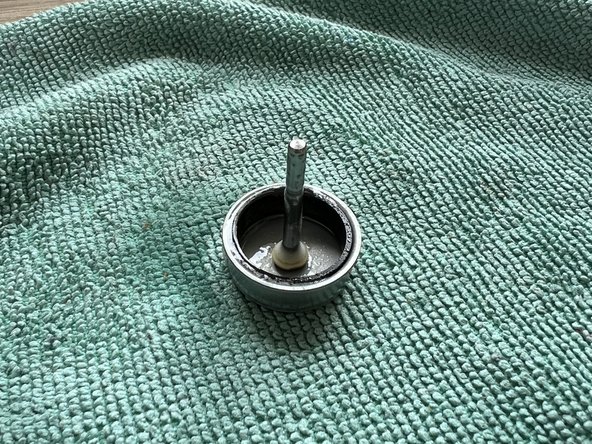
You now need to grease the rotor (axle) so that there is less friction with the stator.
-
You must use silicone spray or semi-solid silicone grease.
-
You can now reassemble your axle to the stator: the problem should be solved.
-
-




To reassemble your device, follow the instructions in reverse order.
Cancel: I did not complete this guide.
6 other people completed this guide.
Special thanks to these translators:
100%


These translators are helping us fix the world! Want to contribute?
Start translating ›

9 Guide Comments
Super tutoriel, avec les photos trés claires.
Super détaillé ce tuto, merci beaucoup ça a marché en ce qui me concerne.
Je rajouterai juste un détail qui a été efficace dans mon cas.
Tant que le stator est à "nu", vérifier l'état des électro-aimants si ils ne sont pas encrassés. C'était mon cas. Plusieurs étaient noirci (ce qui réduit l'efficacité du magnétisme et donc de la puissance de rotation du rotor.
J'ai simplement nettoyé les électro-aimants à l'aide d'un coton tige imbibé d'alcool à brûler.
(Attention de ne pas abîmer le bobinage de cuivre des électro-aimants en accrochant le fil il pourrait se casser )
J'ai des photos, mais je ne peux pas les mettre dans mon commentaire, dommage.
En tout cas merci beaucoup pour ce tuto
Bonjour @willydarphel Félicitations pour votre réparation et merci pour cette piste ! iFixit étant un wiki, sachez que vous pouvez compléter ce tuto avec vos photos et votre expérience, ou bien en créer un nouveau pour expliquer la démarche que vous avez suivie. Vous trouvez plus d'info sur la rédaction des tutos iFixit ici : Creating a Repair Guide La communauté vous en sera reconnaissante !
merci pour ce tuto, avec un temps de réalisation d'à peine plus de 30 min pour tout faire nettoyage global compris, piooouuuu c'est pas étanche IP67 cette bête là ....de la poussière partout dedans !!!!
