
iPod Shuffle 4th Generation Control Button Cover Replacement

Andrew Bookholt and 4 other contributors
Last updated on Mar 19, 2026
Views: 10K
View statistics:
- Past 24 Hours:
- 1
- Past 7 Days:
- 23
- Past 30 Days:
- 120
- All Time:
- 10,404
Comments: 10
8 comments on steps, 2 guide comments.
Go to guide commentsCompleted: 2 3
2 people have marked this guide "completed." Will you be next?
3 people have marked this guide "completed." Including you — great job!
Favorites: 3 4
3 people have favorited (and subscribed to) this guide. Will you be next?
4 people have favorited (and subscribed to) this guide — including you!
Action Shots
Be an action hero! This guide needs images that better demonstrate how to perform specific actions.
Incorrect Tools
Help make this guide better by using the correct tools in images and/or text.
Introduction
Go to step 1 ↓Replace a damaged rubber control button cover.
What you need
Tools


-
-
-
Use a heat gun, hairdryer, iOpener, etc. to heat the back of the Shuffle until it's slightly too hot to the touch.
-
-
-
Use a combination of iPod opening tools and metal spudgers to pry the rear panel away from the Shuffle by the seam nearest the ON/OFF switch.
-
-
-
Remove the rear panel from the Shuffle.
-
There may be a piece of black rubber covering the logic board, or it may come out with the rear panel. This piece is part of a rubber seal that goes around the edges of the rear panel and covers the controls from the inside.
-
-
-
-
Remove the single 2.1 mm Phillips screw securing the logic board to the front case.
-
-
Tool used on this step:Tweezers$4.99
-
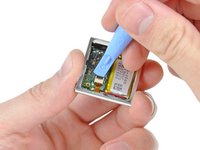
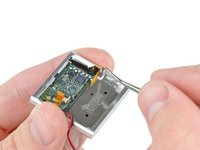
Use the edge of an iPod opening tool to flip up the retaining flap on the control button cable ZIF socket.
-
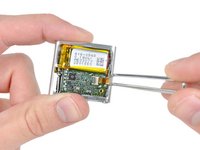
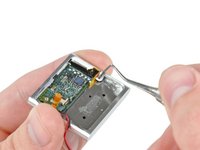
Use a pair of tweezers to gently pull the control button ribbon cable out of its socket.
-
-
-
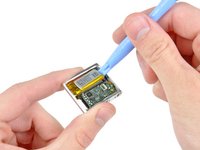
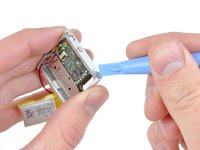
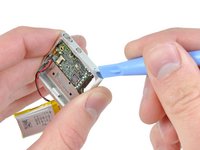
Use an iPod opening tool to gently pry the battery off the adhesive securing it to the front case.
-
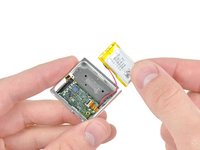
Lift the battery out of the front case, being sure not to strain its delicate leads.
-
-
-
Insert the tip of a metal probe into the hole molded into the logic board retainer nearest the logic board.
-
Pry the retainer first away from the front of the front case, then pull it away from the side of the front case.
-
Remove the logic board retainer from the Shuffle.
-
-
-
Use the edge of an iPod opening tool to push the headphone jack down toward the center of the Shuffle.
-
-
-
-
Continue pushing the logic board down away from the top edge of the Shuffle.
-
Pull the logic board out of the front case by the side nearest the ON/OFF button and gently maneuver the headphone jack out of its recess in the front case.
-
Remove the logic board assembly from the Shuffle.
-
-
-
-
-
Remove the following four screws:
-
Two 1.2 mm Phillips screws with large heads.
-
Two 1.6 mm Phillips screws with small heads.
-
-
-
Use an iPod opening tool to pull the control button plate out of the front case.
-
Remove the control buttons from the Shuffle.
-
-
-
-
-
Push the rubber control button cover out of the front case.
-
-

 Ask FixBot










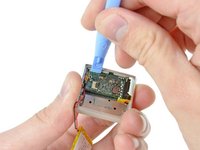
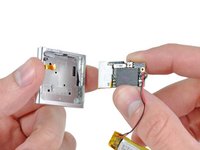


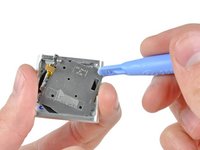
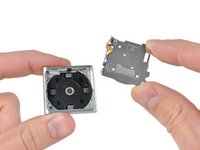

To reassemble your device, follow these instructions in reverse order.
Cancel: I did not complete this guide.
2 other people completed this guide.

