Introduction
Use this guide to remove or replace the SIM card in your iPhone 7 Plus.
What you need
-
-
-
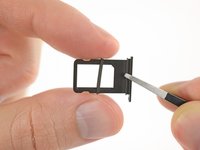
Insert a SIM card eject tool or a paperclip into the small hole in the SIM card tray.
-
Press firmly to eject the tray.
 Ask FixBot
-
-
-


Conclusion
To reassemble your device, follow these instructions in reverse order.
Cancel: I did not complete this guide.
20 other people completed this guide.


1 Guide Comment
Hi, my iPhone 7plus can not recognize my sim in the phone so what can be done on that?
My email address, lipsy1900.ao6@gmail.com. Thank you for your assistance.
