
iHome iH27B Left Control Button Replacement

John Kraemer and 6 other contributors
Last updated on Jul 21, 2026
Views: 1.4K
View statistics:
- Past 24 Hours:
- 2
- Past 7 Days:
- 12
- Past 30 Days:
- 90
- All Time:
- 1,386
Comments: 0
No one has left comments on this guide. Will you be first?
Go to guide commentsCompleted: 0 1
No one has marked this guide "completed." Will you be the first?
1 person has marked this guide "completed." It's you — great job!
Favorites: 2 3
2 people have favorited (and subscribed to) this guide. Will you be next?
3 people have favorited (and subscribed to) this guide — including you!
Needs More Images
A few more images would make this guide's procedures crystal clear.
Missing Steps
Oops! This guide is currently missing one or more important steps.
Action Shots
Be an action hero! This guide needs images that better demonstrate how to perform specific actions.
Better Introduction
Improve this guide by completing or revising its introduction.
What you need
Tools


-
-
-
Remove any iPod or apple music device connected to the iHome and unplug from any power source.
-
Flip the iHome so the speakers are laying on a flat surface, and you have the concealed battery areas facing you.
 Ask FixBot
-
-
-
Using your fingers, press down firmly on the plastic slide and push in the direction of the arrows shown above the word "Open" on the plastic.
-
Remove the plastic slide from its location and set it aside.
-
Remove all 4 AA batteries by placing your fingernail at one end of the battery and applying force upwards until the battery is freed from its holder.
-
Insert your fingernail or a prying tool under the notch of the plastic slide that is protecting the watch battery.
-
Set the plastic covering and the watch battery aside.
-
-
-
Remove the following screws:
-
Eight 10 mm using the Phillips #0 on the bottom of your device.
-
-
-
Use your fingers or a plastic opening tool to carefully pry apart the plastic connections still connecting the base to the top.
-
-
-
Slowly lift the plastic base towards you and lay it on the flat surface. The base should still be connected to the rest of the iHome by a few wires.
-
You should have visible access to most of the components inside the iHome now.
-
-
-
-
-
Pull out the AV circuit board and lift it up and out of the way to allow access to other components.
-
-
-
-
Remove the following screws:
-
Two 10 mm Phillips #0
-
Pull the speakers away and set them aside for now. They should still be connected to the rest of the iHome by two wires.
-
-
-
-
Remove the following 6 screws:
-
Two 7 mm Phillips #0
-
Three 10 mm Phillips #2
-
One 9 mm Phillips #2
-
-
-
-
-
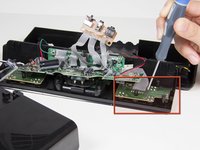
Carefully lift the iHome about an inch from your surface to verify you are going to the correct spot, because the iHome looks symmetrical at this point.
-
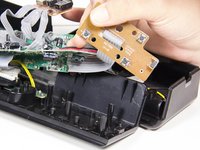
Carefully lift the main motherboard out of the way of the button control circuit board.
-
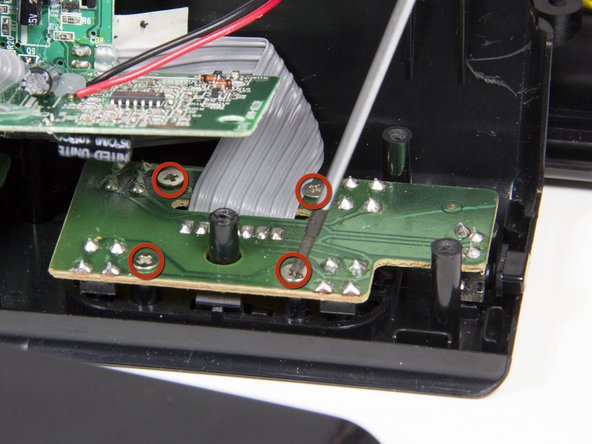
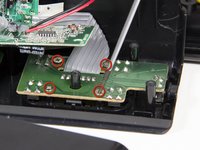
Remove the following screws:
-
Four 6 mm Phillips #2
-
-
-
Carefully lift the button control motherboard out of the way.
-
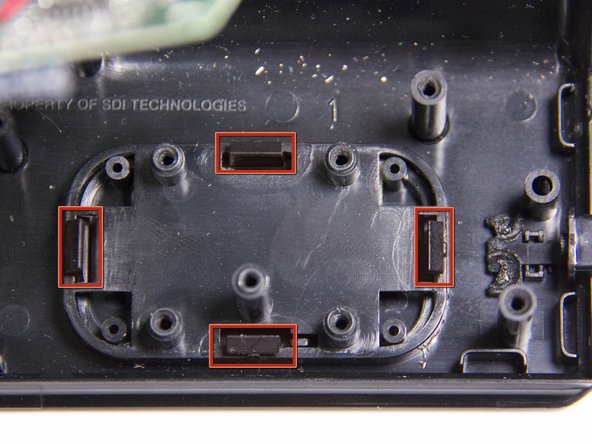
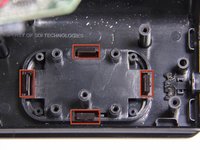
Place your fingers on each of the four notches. Apply pressure towards the center, and push downwards until the plastic piece is dislodged from its casing.
-
If your fingers aren't working, use a flathead screwdriver or plastic prying tool to give you extra leverage.
-
-




To reassemble your device, follow these instructions in reverse order.

Team

Cal Poly, Team 3-21, Amido Fall 2012 Member of Cal Poly, Team 3-21, Amido Fall 2012
CPSU-AMIDO-F12S3G21
4 Members
108 Guides authored
