
iHome iAVS16 Power Board Replacement

Ashley Famularo and 5 other contributors
Last updated on May 7, 2024
Views: 397
View statistics:
- Past 24 Hours:
- 1
- Past 7 Days:
- 7
- Past 30 Days:
- 47
- All Time:
- 397
Comments: 0
No one has left comments on this guide. Will you be first?
Go to guide commentsCompleted: 0 1
No one has marked this guide "completed." Will you be the first?
1 person has marked this guide "completed." It's you — great job!
Favorites: 0 1
No one has favorited (and subscribed to) this guide. Will you be the first?
1 person has favorited (and subscribed to) this guide — and that's you!
Introduction
Go to step 1 ↓This guide shows how to open the bottom of the iHome iAVS16 to gain access to the board housing the AC power and USB jacks.
Since the iHome iAVS16 is a compact device, any following replacement guide will use this guide as well in order to access the rest of the device.
What you need
Tools
-
Tweezers4.9


-
-
-
Remove the four 1.7 mm Phillips #0 screws located on the bottom of the device.
-
Lift up the bottom of the device.
 Ask FixBot
-
-
-
Remove the two 1.7 mm Phillips #0 screws holding the white face place onto the inside of the device's bottom.
-
Using an iFixit opening tool on the side without the black adhesive, carefully lift up the white face plate.
-
-
Tool used on this step:Tweezers$4.99
-
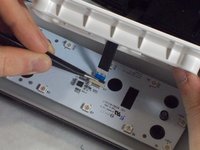
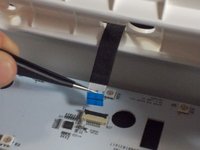
Using the tweezers, lift up on the black tab holding the ribbon cable down.
-
Carefully pull the ribbon cable back and out of the slot.
-
-
-
-
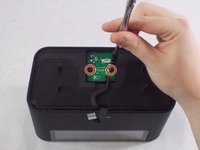
Remove the two 1.7 mm Phillips #0 screws holding the power board in.
-
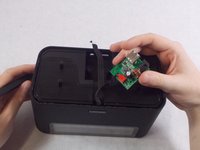
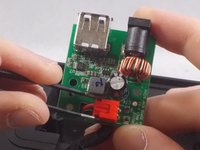
Carefully flip the board over.
-
Remove the red connector from its socket with a pair of tweezers.
-
-




To reassemble your device, follow these instructions in reverse order.

Team

UMass Dartmouth, Team S1-G7, O'Connell Fall 2019 Member of UMass Dartmouth, Team S1-G7, O'Connell Fall 2019
UMASSD-O'CONNELL-F19S1G7
4 Members
60 Guides authored
