
Zune Flash 2nd Generation Back Cover Replacement

ybahman and 7 other contributors
Last updated on Feb 27, 2023
Views: 4.4K
View statistics:
- Past 24 Hours:
- 3
- Past 7 Days:
- 20
- Past 30 Days:
- 107
- All Time:
- 4,412
Comments: 1
1 comment on steps.
Completed: 0 1
No one has marked this guide "completed." Will you be the first?
1 person has marked this guide "completed." It's you — great job!
Favorites: 0 1
No one has favorited (and subscribed to) this guide. Will you be the first?
1 person has favorited (and subscribed to) this guide — and that's you!
Inconsistent Images
Updating the images on this guide to be more consistent with the prerequisites would increase its awesomeness.
Introduction
Go to step 1 ↓This is a guide to replacing the Back Cover on the Zune Flash 2nd Generation.
What you need
Tools


-
-
-
Prior to disassembly, verify the hold switch is engaged to ensure the device will not turn on during the procedure.
-
If the device turns on while it is being disassembled it could cause irreversible damage to the device.
 Ask FixBot
-
-
-
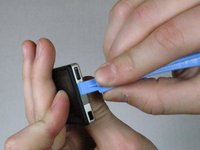
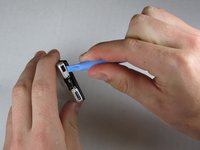
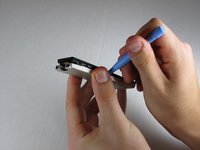
Remove the top metal clip by inserting a Zune opening tool in between the faceplate and back cover and pulling gently back as shown in the images.
-
You should hear a 'click' as the clip detaches from the device.
-
-
-
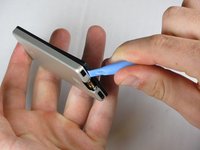
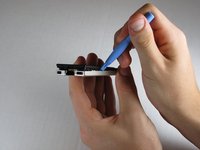
Insert the Zune opening tool between the faceplate and the back cover, starting from the top and slowly work your way around the device.
-
-
-
-
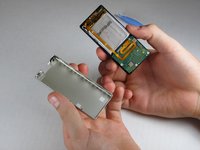
Work your way around the Zune until the back cover comes free. Remove the back plate and set it aside.
-
-




To reassemble your device, follow these instructions in reverse order.

Team

Cal Poly, Team 9-20, Regan Fall 2009 Member of Cal Poly, Team 9-20, Regan Fall 2009
CPSU-REGAN-F09S9G20
5 Members
84 Guides authored
