
Zoomer Meowzies Legs Replacement

Muataz Alahmadi and 3 other contributors
Last updated on May 28, 2018
Views: 696
View statistics:
- Past 24 Hours:
- 1
- Past 7 Days:
- 12
- Past 30 Days:
- 68
- All Time:
- 696
Comments: 0
No one has left comments on this guide. Will you be first?
Go to guide commentsCompleted: 0 1
No one has marked this guide "completed." Will you be the first?
1 person has marked this guide "completed." It's you — great job!
Favorites: 0 1
No one has favorited (and subscribed to) this guide. Will you be the first?
1 person has favorited (and subscribed to) this guide — and that's you!
Introduction
Go to step 1 ↓This is a guide to replace the legs of the Zoomer Meowzies. Removing the legs is a prerequisite to the replacment guides for the Infrared Sensors, LED Screen “Eyes,” and the Speaker.
What you need
Tools

-
-
-
Turn the device so that the the device is on its side.
-
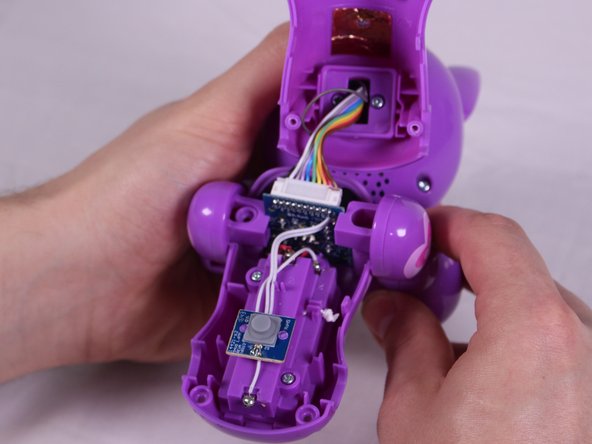
Hold the back and belly on the device and gently pull apart.
-
-
-
-
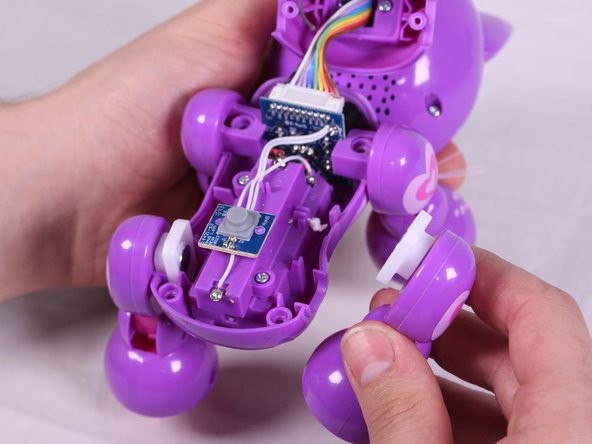
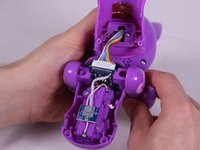
With insides exposed, grab leg and gently pull up and away from the body to detach them. Repeat for all legs needed.
-


 Ask FixBot


To reassemble your device, follow these instructions in reverse order.

Team

USF Tampa, Team S6-G2, Eyestone Spring 2018 Member of USF Tampa, Team S6-G2, Eyestone Spring 2018
USFT-EYESTONE-S18S6G2
3 Members
96 Guides authored
