Free Shipping on Domestic Orders $75+

Zebra ZP 505 Peel and Present System Replacement

What you need

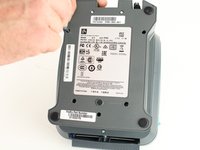
  1. Zebra ZP 505 Peel and Present System Replacement, Peel and Present System: step 1, image 1 of 2 Zebra ZP 505 Peel and Present System Replacement, Peel and Present System: step 1, image 2 of 2
    • Orient the printer so that the bottom is facing up.

    • Remove the three P1 9mm screws located on the bottom of the printer and remove the lower unit.

    Ask FixBot

    Add Comment

  2. Zebra ZP 505 Peel and Present System Replacement: step 2, image 1 of 2 Zebra ZP 505 Peel and Present System Replacement: step 2, image 2 of 2
    • Remove the P0 9mm screw.

    • Proceed to remove the cover.

    Ask FixBot

    Add Comment

  3. Zebra ZP 505 Peel and Present System Replacement: step 3, image 1 of 1
    • Disconnect the harness.

    • Thread the harness through the hole on the right hand side.

    Ask FixBot

    Add Comment

  4. Zebra ZP 505 Peel and Present System Replacement: step 4, image 1 of 1
    • Remove the peel and present system by utilizing a metal spudger.

    Ask FixBot

    Add Comment

  5. Zebra ZP 505 Peel and Present System Replacement: step 5, image 1 of 1
    • Remove the peel and present system.

    Ask FixBot

    Add Comment

Conclusion

To reassemble your device, follow these instructions in reverse order.

Cancel: I did not complete this guide.

Brian Jagger

Member since: 09/27/17

316 Reputation

3 Guides authored

Team

Cal Poly, Team S8-G2, Banghart Fall 2017 Member of Cal Poly, Team S8-G2, Banghart Fall 2017

CPSU-BANGHART-F17S8G2

4 Members

10 Guides authored

0 Guide Comments

Add Comment

View Statistics:

Past 24 Hours: 0

Past 7 Days: 2

Past 30 Days: 18

All Time: 1,115