Free Shipping on Domestic Orders $75+

Zeal Optics iON MicroSD Card Replacement

Views: 1.9K

View statistics:

Past 24 Hours:
1
Past 7 Days:
17
Past 30 Days:
81
All Time:
1,879
Comments: 1

1 guide comment.

Go to guide comments
Completed: 0

No one has marked this guide "completed." Will you be the first?

Favorites: 0

No one has favorited (and subscribed to) this guide. Will you be the first?

Time Required: No estimate
Difficulty: Very easy
Zeal Optics iON MicroSD Card Replacement

Introduction

Go to step 1 ↓

When your memory card is full, you can follow these steps to install another microSD card in your iON.

    1. Zeal Optics iON MicroSD Card Replacement, MicroSD Card: step 1, image 1 of 2 Zeal Optics iON MicroSD Card Replacement, MicroSD Card: step 1, image 2 of 2
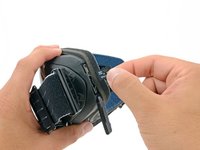
      • Peel the rubber cover for the memory card and USB port away from the goggles.

      • Be careful not to completely remove the cover!

      Ask FixBot

      Add Comment

    2. Zeal Optics iON MicroSD Card Replacement: step 2, image 1 of 2 Zeal Optics iON MicroSD Card Replacement: step 2, image 2 of 2
      • Push the memory card in until you hear it click.

      • Pull your finger away.

      • If you pull your finger away too quickly, the card can completely pop out of the slot and could get lost!

      • The memory card will pop out about half way out of its slot.

      Ask FixBot

      Add Comment

    3. Zeal Optics iON MicroSD Card Replacement: step 3, image 1 of 2 Zeal Optics iON MicroSD Card Replacement: step 3, image 2 of 2
      • Pull the memory card straight out of its slot.

      Ask FixBot

      Add Comment

Conclusion

To reassemble your device, follow these instructions in reverse order.

Cancel: I did not complete this guide.

Eric Flores

Member since: 07/31/12

128 Reputation

9 Guides authored

1 Guide Comment

What memory card size does it need

MileHiBoi - Reply Share

Add Comment

View Statistics:

Past 24 Hours: 1

Past 7 Days: 17

Past 30 Days: 81

All Time: 1,879