Free Shipping on Domestic Orders $75+

ZTE ZMAX Z970 Rear Camera Replacement

What you need

    1. ZTE ZMAX Z970 Rear Camera Replacement, Battery: step 1, image 1 of 2 ZTE ZMAX Z970 Rear Camera Replacement, Battery: step 1, image 2 of 2
      • Insert a fine point tool into the hole on the top left side of the phone to remove the SIM and SD card trays.

      • Pull out the trays.

      Ask FixBot

      Add Comment

    2. ZTE ZMAX Z970 Rear Camera Replacement: step 2, image 1 of 2 ZTE ZMAX Z970 Rear Camera Replacement: step 2, image 2 of 2
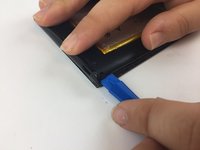
      • Insert a plastic opening tool into the groove between the phone’s back cover and casing.

      • Move the plastic opening tool along the edges of the phone to unclip the two pieces.

      Ask FixBot

      Add Comment

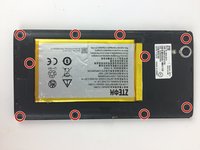
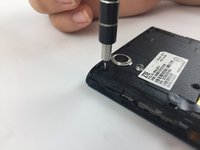
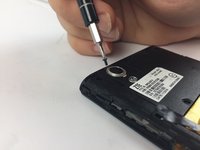
    3. ZTE ZMAX Z970 Rear Camera Replacement: step 3, image 1 of 3 ZTE ZMAX Z970 Rear Camera Replacement: step 3, image 2 of 3 ZTE ZMAX Z970 Rear Camera Replacement: step 3, image 3 of 3
      • Remove the ten 1.2mm screws with a Phillips #000 screwdriver.

      Ask FixBot

      Add Comment

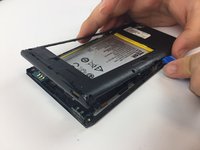
    4. ZTE ZMAX Z970 Rear Camera Replacement: step 4, image 1 of 2 ZTE ZMAX Z970 Rear Camera Replacement: step 4, image 2 of 2
      • Remove the mid frame with the plastic opening tool.

      Ask FixBot

      Add Comment

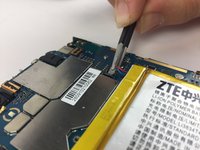
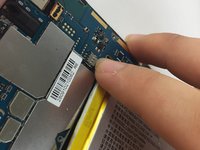
    5. ZTE ZMAX Z970 Rear Camera Replacement: step 5, image 1 of 2 ZTE ZMAX Z970 Rear Camera Replacement: step 5, image 2 of 2
      • Disconnect the battery from the motherboard.

      Ask FixBot

      Add Comment

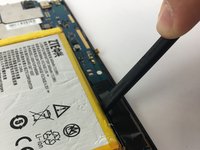
    6. ZTE ZMAX Z970 Rear Camera Replacement: step 6, image 1 of 2 ZTE ZMAX Z970 Rear Camera Replacement: step 6, image 2 of 2
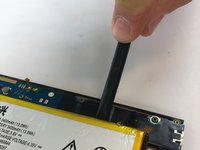
      • Wedge a spudger underneath the battery and gently pry upwards to remove the battery.

      • Once free from the glue, remove from device.

      • The glue holding down the battery is strong so work slow and cautiously to avoid starting a fire.

      Ask FixBot

      Add Comment

    1. ZTE ZMAX Z970 Rear Camera Replacement, Rear Camera: step 7, image 1 of 2 ZTE ZMAX Z970 Rear Camera Replacement, Rear Camera: step 7, image 2 of 2
      Tool used on this step:
      Tweezers
      $4.99
      Buy
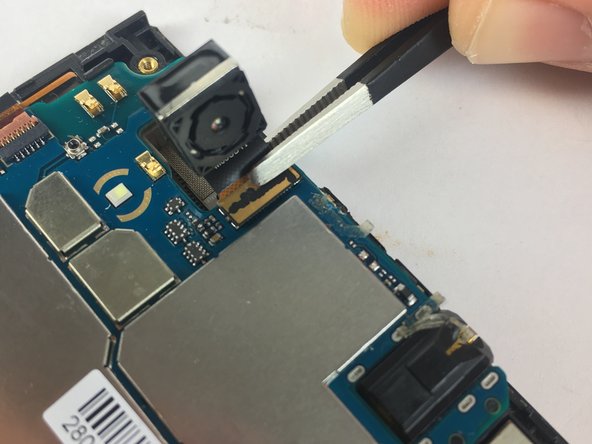
      • Disconnect the camera from the motherboard with the flat end of a spudger.

      • Remove carefully with tweezers.

      Ask FixBot

      Add Comment

Conclusion

To reassemble your device, follow these instructions in reverse order.

Cancel: I did not complete this guide.

Burak Cengiz

Member since: 02/15/18

480 Reputation

4 Guides authored

Team

USF Tampa, Team S17-G3, Boczar Spring 2018 Member of USF Tampa, Team S17-G3, Boczar Spring 2018

USFT-BOCZAR-S18S17G3

3 Members

60 Guides authored

0 Guide Comments

Add Comment

View Statistics:

Past 24 Hours: 0

Past 7 Days: 5

Past 30 Days: 22

All Time: 590