
ZTE Whirl 2 Battery Replacement

Alana and 2 other contributors
Last updated on Jun 16, 2020
Views: 462
View statistics:
- Past 24 Hours:
- 0
- Past 7 Days:
- 11
- Past 30 Days:
- 54
- All Time:
- 462
Comments: 0
No one has left comments on this guide. Will you be first?
Go to guide commentsCompleted: 0 1
No one has marked this guide "completed." Will you be the first?
1 person has marked this guide "completed." It's you — great job!
Favorites: 0 1
No one has favorited (and subscribed to) this guide. Will you be the first?
1 person has favorited (and subscribed to) this guide — and that's you!
Introduction
Go to step 1 ↓Use this guide if you need to remove or replace your battery for ZTE Whirl 2 Model Z776G. Before you start refer to the Troubleshooting Page to see if there is another solution to your problem.
-
-
-
Power off your phone before removing the battery.
-
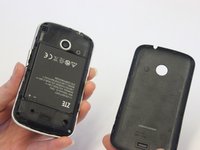
Pry the cover off the back of the phone using your fingers.
 Ask FixBot
-
-
-




To reassemble your device, follow these instructions in reverse order.

Team

UW Stout, Team S1-G1, Schneider-Bateman Spring 2020 Member of UW Stout, Team S1-G1, Schneider-Bateman Spring 2020
UWSTOUT-SCHNEIDER-BATEMAN-S20S1G1
3 Members
60 Guides authored
