Introduction
The step-by-step guide will instruct users on how to replace the front speaker on the ZTE Tempo smartphone. The speaker will need to be replaced if any audio issues are occurring. This guide will provide details on opening the phone’s back case and removing the front speaker inside the phone. This task requires an opening tool, tweezers, and a Phillips #0 screwdriver.
What you need
-
-
-
Use a plastic opening tool to pry open the back case.
-
Use a Phillips #0 screwdriver to remove the eight 5mm screws.
-
Use a plastic opening tool to remove the midframe.
 Ask FixBot
-
-
-
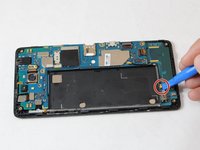
Use a plastic opening tool to lift the press-fit connector up and disconnect the battery ribbon cable.
-
Lift the battery up and remove it from the phone.
-
-
-
-
-
-
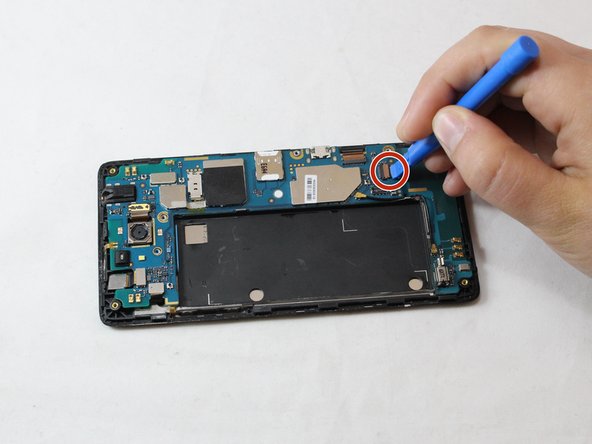
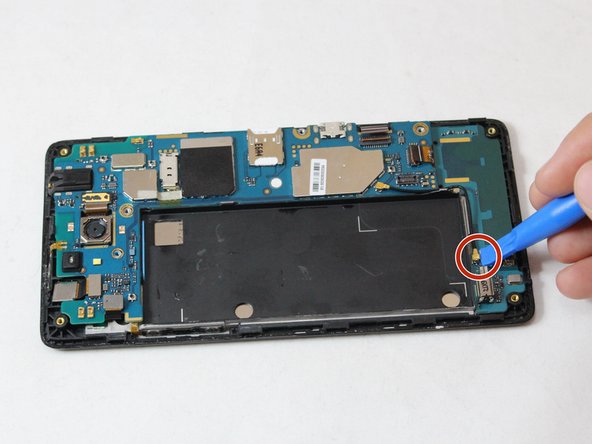
Use a plastic opening tool to unplug the wires by pulling them to the side.
-
-
Tool used on this step:Tweezers$4.99
-
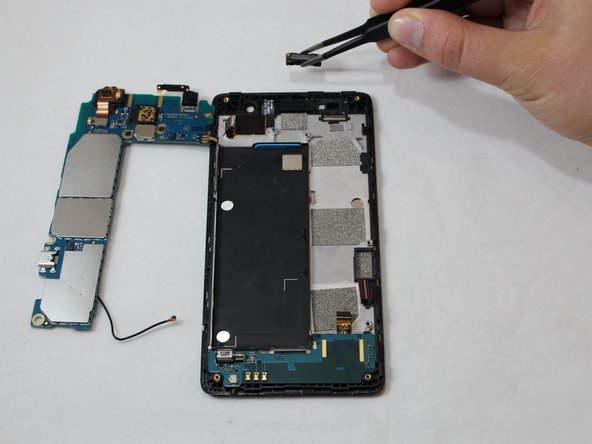
Use metal tweezers to remove the front speaker.
-
-




To reassemble your device, follow these instructions in reverse order.
Cancel: I did not complete this guide.
2 other people completed this guide.

Team

Eastern Washington University, Team S2-G3, Munoz Fall 2018 Member of Eastern Washington University, Team S2-G3, Munoz Fall 2018
EWU-MUNOZ-F18S2G3
4 Members
72 Guides authored
