Free Shipping on Domestic Orders $75+

ZTE Grand X Max Plus SIM Card Replacement

What you need

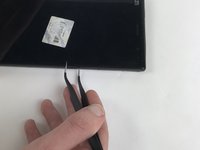
    1. ZTE Grand X Max Plus SIM Card Replacement, SIM Card: step 1, image 1 of 3 ZTE Grand X Max Plus SIM Card Replacement, SIM Card: step 1, image 2 of 3 ZTE Grand X Max Plus SIM Card Replacement, SIM Card: step 1, image 3 of 3
      Tool used on this step:
      Tweezers
      $4.99
      Buy
      • The ZTE Grand X Max Plus contains space for two SIM cards.

      • Push one side of the tweezers into the hole.

      • Pull the plastic piece holding the card.

      • Remove the card.

      Ask FixBot

      Add Comment

    2. ZTE Grand X Max Plus SIM Card Replacement: step 2, image 1 of 1
      • When you insert the new card, make sure it is inserted in the same way that the previous card was.

      • You can repeat the same process for the other card.

      Ask FixBot

      Add Comment

Conclusion

To reassemble your device, follow these instructions in reverse order.

Cancel: I did not complete this guide.

Jordano Baer

Member since: 10/02/17

716 Reputation

5 Guides authored

Team

USF Tampa, Team S9-G4, Remmell Fall 2017 Member of USF Tampa, Team S9-G4, Remmell Fall 2017

USFT-REMMELL-F17S9G4

4 Members

60 Guides authored

0 Guide Comments

Add Comment

View Statistics:

Past 24 Hours: 1

Past 7 Days: 9

Past 30 Days: 38

All Time: 1,209