Introduction
This guide walks you through replacing the RAM in a ZOTAC ZBOX MI642 Nano mini PC. The MI642 Nano is sold as a barebones unit, meaning it often ships without RAM pre-installed, and users may also receive the device secondhand with a faulty or incompatible memory module. Completing this replacement will restore normal system function, resolve boot failures caused by faulty RAM, and prepare a barebones unit for first use.
Never work on the device while it is plugged in. Failing to disconnect power before opening the device risks electric shock and permanent damage to internal components.
What you need
-
-
-
Shut down the ZOTAC ZBOX MI642 Nano completely through the operating system; do not simply put it to sleep. Once the device has fully powered off, disconnect the power cable from the rear of the unit.
-
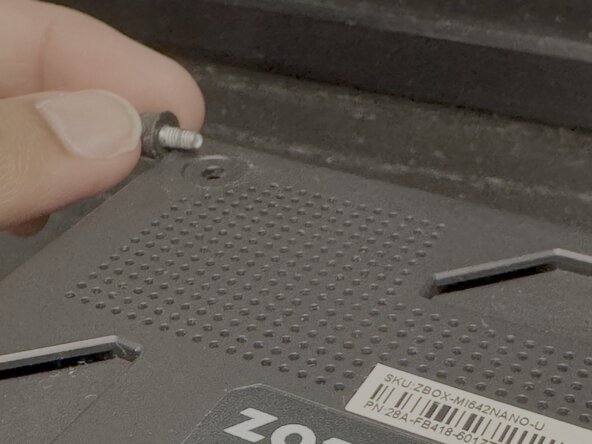
Turn the ZBOX MI642 Nano upside-down and place it on a soft, clean surface such as a cloth mat or folded towel.
 Ask FixBot
-
-
-
-
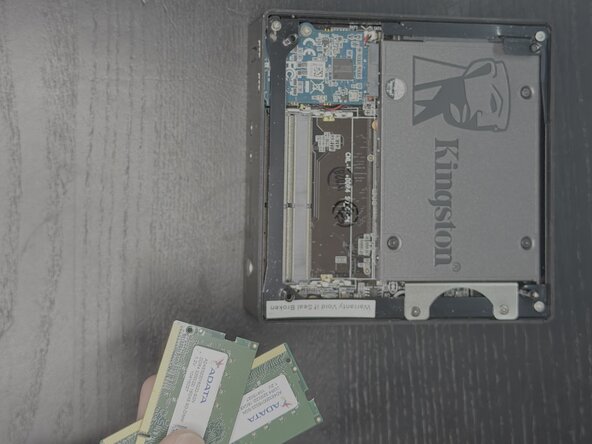
The two SO-DIMM RAM slots are positioned horizontally near the top of the motherboard, just beneath the SSD, side by side.
-
-
-
Hold your new DDR4 SO-DIMM module by its edges and orient it so the notch on the gold connector edge aligns with the raised key inside the RAM slot.
-
-
-
Insert the module into the slot at a 45-degree angle, pushing it in firmly until it is fully seated in the connector.
-
Press the module down flat toward the motherboard. The two retention clips on either side will snap into place audibly, locking the module flat.
-
-
-
Align the bottom panel with the device body and press it down gently until it sits flush.
-
-
-
Reconnect the power cable and press the power button to turn on the device.
-
To confirm the new RAM is recognized, access the BIOS by pressing the delete during startup, and check the memory information displayed.
-
-






You've successfully replaced your RAM on your ZOTAC MI642 NANO Mini PC!
Attached Documents

Team

York University, Team 4-3, Woodhouse Winter 2026 Member of York University, Team 4-3, Woodhouse Winter 2026
YORK-WOODHOUSE-W26S4G3
2 Members
12 Guides authored
