Free Shipping on Domestic Orders $75+

ZD-N Plus Wireless Controller Motherboard Replacement

Views: 653

View statistics:

Past 24 Hours:
1
Past 7 Days:
11
Past 30 Days:
56
All Time:
653
Comments: 0

No one has left comments on this guide. Will you be first?

Go to guide comments
Completed: 1

1 person has marked this guide "completed." Will you be next?

Favorites: 0

No one has favorited (and subscribed to) this guide. Will you be the first?

Time Required: 5 minutes
Difficulty: Moderate
Needs More Images

A few more images would make this guide's procedures crystal clear.

Better Introduction

Improve this guide by completing or revising its introduction.

ZD-N Plus Wireless Controller Motherboard Replacement

What you need

Tools

    1. ZD-N Plus Wireless Controller Motherboard Replacement, Back Panel: step 1, image 1 of 1
      • Remove the seven 12mm JIS #00 screws that hold the back panel in place.

      Ask FixBot

      Add Comment

    2. ZD-N Plus Wireless Controller Motherboard Replacement: step 2, image 1 of 2 ZD-N Plus Wireless Controller Motherboard Replacement: step 2, image 2 of 2
      • Lift up on the back panel of the ZD-N Plus to remove it from the rest of the controller.

      Ask FixBot

      Add Comment

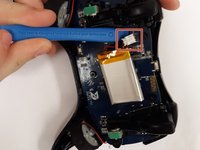
    1. ZD-N Plus Wireless Controller Motherboard Replacement, Battery: step 3, image 1 of 1
      • Use an opening tool to pry the battery from its original position.

      • The battery is glued on, so this may take some effort.

      Ask FixBot

      Add Comment

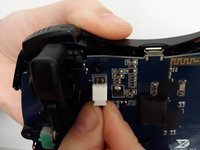
    2. ZD-N Plus Wireless Controller Motherboard Replacement: step 4, image 1 of 2 ZD-N Plus Wireless Controller Motherboard Replacement: step 4, image 2 of 2
      • Use an opening tool to pry the connector away from the two metallic prongs.

      • The parts are built to stay together, so this may take some effort.

      • Be careful to not warp the prongs in the process.

      Ask FixBot

      Add Comment

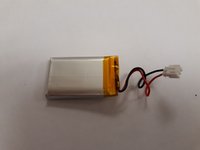
    3. ZD-N Plus Wireless Controller Motherboard Replacement: step 5, image 1 of 2 ZD-N Plus Wireless Controller Motherboard Replacement: step 5, image 2 of 2
      • Remove the battery from the controller.

      Ask FixBot

      Add Comment

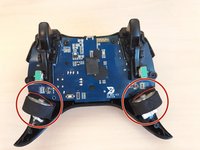
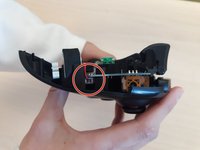
    1. ZD-N Plus Wireless Controller Motherboard Replacement, Rumble Motor: step 6, image 1 of 2 ZD-N Plus Wireless Controller Motherboard Replacement, Rumble Motor: step 6, image 2 of 2
      • Remove the electrical connector attaching each rumble motor to the controller.

      • Lift up on the circular section of the rumble to remove it from the controller.

      Ask FixBot

      Add Comment

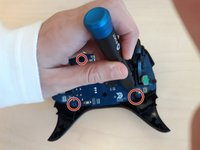
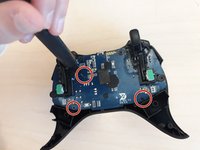
    1. ZD-N Plus Wireless Controller Motherboard Replacement, Motherboard: step 7, image 1 of 2 ZD-N Plus Wireless Controller Motherboard Replacement, Motherboard: step 7, image 2 of 2
      • Remove the three 1.2mm JIS #00 screws that hold the motherboard in place.

      Ask FixBot

      Add Comment

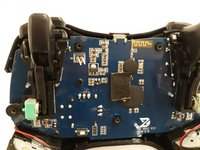
    2. ZD-N Plus Wireless Controller Motherboard Replacement: step 8, image 1 of 1
      • Lift the motherboard out of the controller.

      Ask FixBot

      Add Comment

Conclusion

To reassemble your device, follow these instructions in reverse order.

Cancel: I did not complete this guide.

One other person completed this guide.

0 Guide Comments

Add Comment

View Statistics:

Past 24 Hours: 1

Past 7 Days: 11

Past 30 Days: 56

All Time: 653