Introduction
If you own a Yuneec ST10 Plus, there is a chance your battery will stop holding its charging capacity over time. The main causes of this issue are battery overheating, and the end of your battery charge/discharge cycles. Follow this step-by-step guide on how to replace your battery. No tools required and a quick replacement.
-
-
-
Flip the controller upside down to access the battery compartment.
-
Grab the compartment door and pull down.
 Ask FixBot
-
-
-
-
Gently lift the blue tab connected to the battery in order to remove the battery from its housing.
-
-
-
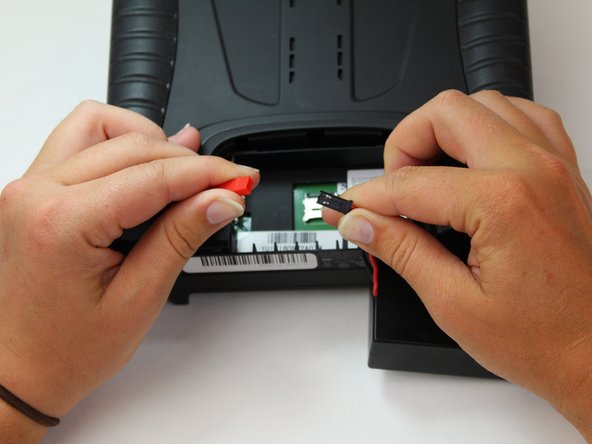
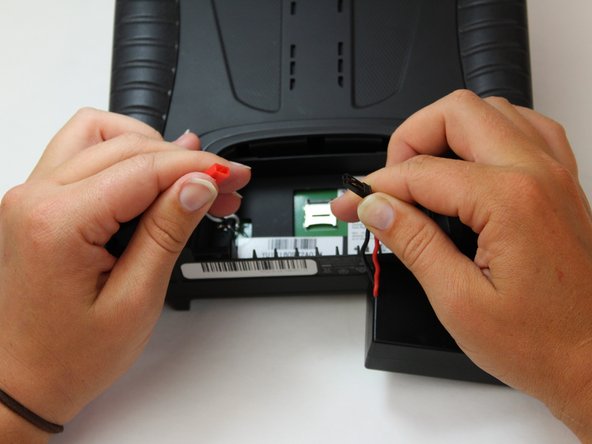
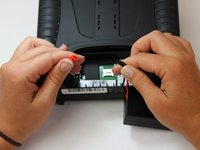
To disconnect the battery from the remote, grab the red and black connectors.
-
Pull gently on connectors until they disconnect.
-
-


To reassemble your device, follow these instructions in reverse order.
Cancel: I did not complete this guide.
2 other people completed this guide.

Team

Embry-Riddle Aeronautical University, Team S6-G6, Watkins Spring 2020 Member of Embry-Riddle Aeronautical University, Team S6-G6, Watkins Spring 2020
ERAU-WATKINS-S20S6G6
5 Members
60 Guides authored
