Introduction
If your child’s Yeehao digital camera won’t turn on or the battery won’t hold a charge, the rechargeable battery may need to be replaced. Before beginning this repair, make sure the charging cable is working properly, as there may be other reasons the battery isn’t charging.
Rechargeable batteries have a limited lifespan and eventually lose their ability to hold a charge after repeated charging cycles.
Caution: Step 4 involves removing the battery. Before removing it, inspect the battery for signs of damage or swelling. If the battery is swollen or damaged, do not puncture, bend, or otherwise handle it unnecessarily. Follow the What to do with a swollen battery guide for information on safely handling and disposing of it.
What you need
-
-
-
Use a Phillips #00 screwdriver to remove the two 1.5 mm screws from the bottom of the camera.
 Ask FixBot
-
-
-
Insert a plastic opening tool into the bottom right corner to create some space between the top and bottom case.
-
Slide an opening pick around the perimeter to release the clips holding it together.
-
-
-
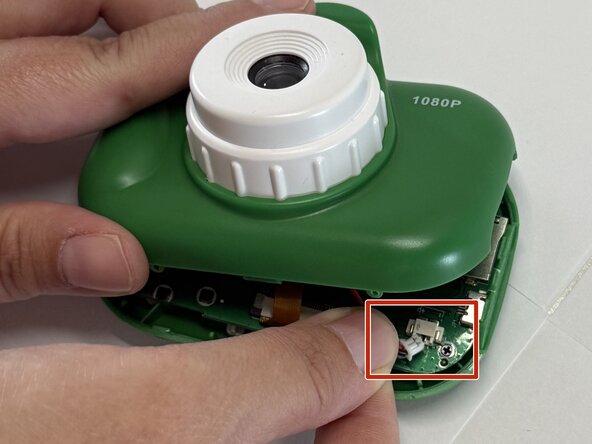
Carefully disconnect the battery power JST cable connector in the bottom-right corner.
-
-
-
-
Gently pull the silver lithium-ion battery out of the camera.
-
Remove the yellow plastic around the power connectors.
-
-
-
Once your solder gun is hot, desolder the power cords.
-
Press the hot soldering iron tip gently onto the solder joint until the metal liquifies.
-
Remove the first power cable and repeat the process on the other solder joint
-
-
-
Place a small strip of double-sided tape on the back of the new battery.
-
Use a soldering iron to solder the power cables to the replacement battery.
-
-
-
Place the new battery between the retaining clips, with the double-sided tape facing down against the inside wall of the housing.
-
-




After reassembly, be sure to charge your camera battery before powering on. Take your e-waste to an R2 or e-Stewards certified recycler.

Team

Austin Community College, Team A-4, Serna Summer 2026 Member of Austin Community College, Team A-4, Serna Summer 2026
AUSTINCC-SERNA-SU26SAG4
1 Member
12 Guides authored
