Free Shipping on Domestic Orders $75+

Xiaomi Redmi Note 4X Battery Replacement

What you need

  1. Xiaomi Redmi Note 4X Battery Replacement, Removing the back cover: step 1, image 1 of 3 Xiaomi Redmi Note 4X Battery Replacement, Removing the back cover: step 1, image 2 of 3 Xiaomi Redmi Note 4X Battery Replacement, Removing the back cover: step 1, image 3 of 3
    • The first thing we have to do is use a pry tool to remove the back cover (make sure to remove the sim tray first)

    Ask FixBot

    Add Comment

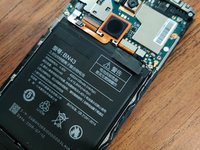
  2. Xiaomi Redmi Note 4X Battery Replacement, Removing the Battery: step 2, image 1 of 3 Xiaomi Redmi Note 4X Battery Replacement, Removing the Battery: step 2, image 2 of 3 Xiaomi Redmi Note 4X Battery Replacement, Removing the Battery: step 2, image 3 of 3
    • Now we have to remove the battery, luckily the Battery can be removed first after taking the back cover off.

    Ask FixBot

    Add Comment

  3. Xiaomi Redmi Note 4X Battery Replacement, Reassembly: step 3, image 1 of 2 Xiaomi Redmi Note 4X Battery Replacement, Reassembly: step 3, image 2 of 2
    • Now you can insert your new battery, pop the back cover on, and your good to go! Congratulations, you've just replaced your phone's battery.

    Ask FixBot

    Add Comment

Conclusion

Congratulations on repairing your smartphone!

Cancel: I did not complete this guide.

2 other people completed this guide.

Isaiah Kochis

Member since: 09/02/20

235 Reputation

2 Guides authored

0 Guide Comments

Add Comment

View Statistics:

Past 24 Hours: 4

Past 7 Days: 24

Past 30 Days: 80

All Time: 4,400