Free Shipping on Domestic Orders $75+

Xiaomi Redmi 2 Motherboard Replacement

What you need

  1. Xiaomi Redmi 2 Motherboard Replacement, Motherboard: step 1, image 1 of 2 Xiaomi Redmi 2 Motherboard Replacement, Motherboard: step 1, image 2 of 2
    • Use the flat end of the spudger to remove the back panel from the mid-frame and front body.

    Ask FixBot

    Add Comment

  2. Xiaomi Redmi 2 Motherboard Replacement: step 2, image 1 of 1
    • Insert your finger into the curved opening of the mid-frame.

    • Lift the battery and remove.

    Ask FixBot

    Add Comment

  3. Xiaomi Redmi 2 Motherboard Replacement: step 3, image 1 of 1
    • Remove the SIM and/or memory cards if present.

    • Remove twelve 3.4 mm Phillips #000 screws securing the mid-frame to the front body.

    Ask FixBot

    Add Comment

  4. Xiaomi Redmi 2 Motherboard Replacement: step 4, image 1 of 1
    • Slide the spudger between the mid-frame and front body, gradually prying the two bodies apart as you slide the spudger around the perimeter of the phone.

    Ask FixBot

    Add Comment

  5. Xiaomi Redmi 2 Motherboard Replacement: step 5, image 1 of 1
    • Remove the 3.4 mm Phillips #000 screw that holds the motherboard to the front body.

    • Keep this screw separate from the initial twelve.

    Ask FixBot

    Add Comment

  6. Xiaomi Redmi 2 Motherboard Replacement: step 6, image 1 of 2 Xiaomi Redmi 2 Motherboard Replacement: step 6, image 2 of 2
    Tool used on this step:
    Tweezers
    $4.99
    Buy
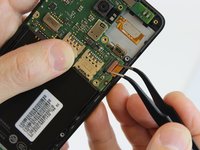
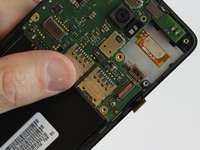
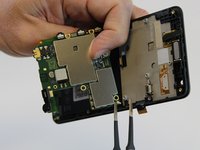
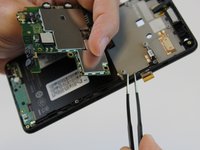
    • Using one prong of the tweezers, pry back the brown clip located on top of the LCD ribbon connector.

    Ask FixBot

    Add Comment

  7. Xiaomi Redmi 2 Motherboard Replacement: step 7, image 1 of 2 Xiaomi Redmi 2 Motherboard Replacement: step 7, image 2 of 2
    • Using one prong of the tweezers, pry the ribbon clip away from the motherboard.

    Ask FixBot

    Add Comment

  8. Xiaomi Redmi 2 Motherboard Replacement: step 8, image 1 of 2 Xiaomi Redmi 2 Motherboard Replacement: step 8, image 2 of 2
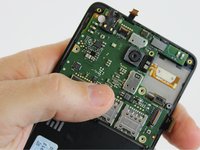
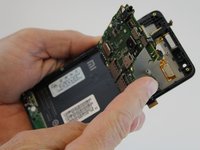
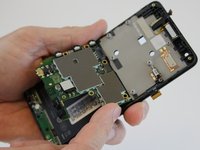
    • Lift and hinge the motherboard with your fingers.

    Ask FixBot

    Add Comment

  9. Xiaomi Redmi 2 Motherboard Replacement: step 9, image 1 of 2 Xiaomi Redmi 2 Motherboard Replacement: step 9, image 2 of 2
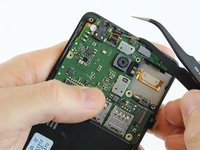
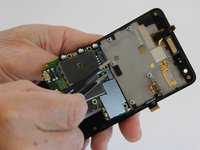
    • Using one prong of the tweezers, lift and pry back the metal clip positioned over the front proximity sensor ribbon connector.

    Ask FixBot

    Add Comment

  10. Xiaomi Redmi 2 Motherboard Replacement: step 10, image 1 of 2 Xiaomi Redmi 2 Motherboard Replacement: step 10, image 2 of 2
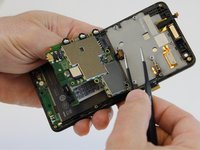
    • Using the tweezers, pull the antenna connector from the motherboard.

    Ask FixBot

    Add Comment

  11. Xiaomi Redmi 2 Motherboard Replacement: step 11, image 1 of 1
    • Lift the motherboard out of the front cover and set aside.

    Ask FixBot

    Add Comment

Conclusion

To reassemble your device, follow these instructions in reverse order.

Cancel: I did not complete this guide.

47 other people completed this guide.

Alicia Brenner

Member since: 10/01/15

3,569 Reputation

5 Guides authored

Team

USF Tampa, Team 1-3, Leahy Fall 2015 Member of USF Tampa, Team 1-3, Leahy Fall 2015

USFT-LEAHY-F15S1G3

2 Members

5 Guides authored

17 Guide Comments

this is very helpful

Ana - Reply Share

hi brother mi phone was water damaged .it was not wrking i mean phone gets on but no display. phone gets ring and i can lift call and speak. when i connect to laptop i can access files in it. its get charging on connecting to charger

can u suggest me wat to do

please

asreefbashak - Reply Share

may be LCD is damage. can fix it at 82877181 contact Peter for checking.

netman91 - Reply Share

Hi bro I'm having redmi 2 mobile and it has a problem it is not taking any os it's having a compliant of not receiving os .....

There is any solution for that

Please give me reply bro any suggestions

jhon Carter - Reply Share

Can i know the name of the motherboard used for redmi 2 prime 16GB,please tell me the name bro

Jakka Akhilesh - Reply Share

Add Comment

View Statistics:

Past 24 Hours: 3

Past 7 Days: 23

Past 30 Days: 68

All Time: 36,155