Free Shipping on Domestic Orders $75+

Xiaomi Redmi 2 Ambient Light Sensor Replacement

What you need

    1. Xiaomi Redmi 2 Ambient Light Sensor Replacement, Motherboard: step 1, image 1 of 2 Xiaomi Redmi 2 Ambient Light Sensor Replacement, Motherboard: step 1, image 2 of 2
      • Use the flat end of the spudger to remove the back panel from the mid-frame and front body.

      Ask FixBot

      Add Comment

    2. Xiaomi Redmi 2 Ambient Light Sensor Replacement: step 2, image 1 of 1
      • Insert your finger into the curved opening of the mid-frame.

      • Lift the battery and remove.

      Ask FixBot

      Add Comment

    3. Xiaomi Redmi 2 Ambient Light Sensor Replacement: step 3, image 1 of 1
      • Remove the SIM and/or memory cards if present.

      • Remove twelve 3.4 mm Phillips #000 screws securing the mid-frame to the front body.

      Ask FixBot

      Add Comment

    4. Xiaomi Redmi 2 Ambient Light Sensor Replacement: step 4, image 1 of 1
      • Slide the spudger between the mid-frame and front body, gradually prying the two bodies apart as you slide the spudger around the perimeter of the phone.

      Ask FixBot

      Add Comment

    5. Xiaomi Redmi 2 Ambient Light Sensor Replacement: step 5, image 1 of 1
      • Remove the 3.4 mm Phillips #000 screw that holds the motherboard to the front body.

      • Keep this screw separate from the initial twelve.

      Ask FixBot

      Add Comment

    6. Xiaomi Redmi 2 Ambient Light Sensor Replacement: step 6, image 1 of 2 Xiaomi Redmi 2 Ambient Light Sensor Replacement: step 6, image 2 of 2
      Tool used on this step:
      Tweezers
      $4.99
      Buy
      • Using one prong of the tweezers, pry back the brown clip located on top of the LCD ribbon connector.

      Ask FixBot

      Add Comment

    7. Xiaomi Redmi 2 Ambient Light Sensor Replacement: step 7, image 1 of 2 Xiaomi Redmi 2 Ambient Light Sensor Replacement: step 7, image 2 of 2
      • Using one prong of the tweezers, pry the ribbon clip away from the motherboard.

      Ask FixBot

      Add Comment

    8. Xiaomi Redmi 2 Ambient Light Sensor Replacement: step 8, image 1 of 2 Xiaomi Redmi 2 Ambient Light Sensor Replacement: step 8, image 2 of 2
      • Lift and hinge the motherboard with your fingers.

      Ask FixBot

      Add Comment

    9. Xiaomi Redmi 2 Ambient Light Sensor Replacement: step 9, image 1 of 2 Xiaomi Redmi 2 Ambient Light Sensor Replacement: step 9, image 2 of 2
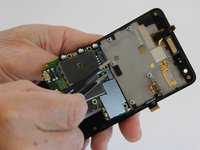
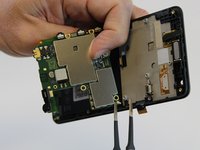
      • Using one prong of the tweezers, lift and pry back the metal clip positioned over the front proximity sensor ribbon connector.

      Ask FixBot

      Add Comment

    10. Xiaomi Redmi 2 Ambient Light Sensor Replacement: step 10, image 1 of 2 Xiaomi Redmi 2 Ambient Light Sensor Replacement: step 10, image 2 of 2
      • Using the tweezers, pull the antenna connector from the motherboard.

      Ask FixBot

      Add Comment

    11. Xiaomi Redmi 2 Ambient Light Sensor Replacement: step 11, image 1 of 1
      • Lift the motherboard out of the front cover and set aside.

      Ask FixBot

      Add Comment

    1. Xiaomi Redmi 2 Ambient Light Sensor Replacement, Ambient Light Sensor: step 12, image 1 of 1
      Tool used on this step:
      Tweezers
      $4.99
      Buy
      • Using one prong of the tweezers, lift and loosen the edge of the ambient light sensor from the motherboard.

      Ask FixBot

      Add Comment

    2. Xiaomi Redmi 2 Ambient Light Sensor Replacement: step 13, image 1 of 1
      • Using your fingers, gently pull out the ambient light sensor.

      Ask FixBot

      Add Comment

Conclusion

To reassemble your device, follow these instructions in reverse order.

Cancel: I did not complete this guide.

17 other people completed this guide.

Alicia Brenner

Member since: 10/01/15

3,569 Reputation

5 Guides authored

Team

USF Tampa, Team 1-3, Leahy Fall 2015 Member of USF Tampa, Team 1-3, Leahy Fall 2015

USFT-LEAHY-F15S1G3

2 Members

60 Guides authored

1 Guide Comment

Thank you for giving her tips . http://www.lawumedia.com/161/daftar-harg...

Ahmad Adzan - Reply Share

Add Comment

View Statistics:

Past 24 Hours: 2

Past 7 Days: 7

Past 30 Days: 59

All Time: 5,969