Introduction
For problems pertaining to battery consumption or low charging rate, please read this guide. This guide is for replacing the battery on the Xgody D300. Please follow the steps carefully. By the end, your phone should be working as it normally should.
What you need
-
-
-
-
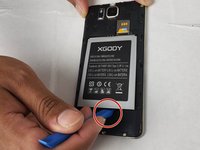
Insert the pry tool into the seam and pry the back cover of the case along the seam until the cover is free of the case.
-

 Ask FixBot


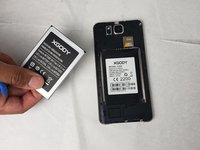
To reassemble your device, follow these instructions in reverse order.
Cancel: I did not complete this guide.
3 other people completed this guide.

Team

Embry-Riddle Aeronautical University, Team S24-G5, McClure Fall 2019 Member of Embry-Riddle Aeronautical University, Team S24-G5, McClure Fall 2019
ERAU-MCCLURE-F19S24G5
4 Members
60 Guides authored
