Free Shipping on Domestic Orders $75+

Xbox 360 Wireless Controller battery holder spring Replacement

What you need

  1. Xbox 360 Wireless Controller battery holder spring Replacement, Battery Pack: step 1, image 1 of 2 Xbox 360 Wireless Controller battery holder spring Replacement, Battery Pack: step 1, image 2 of 2
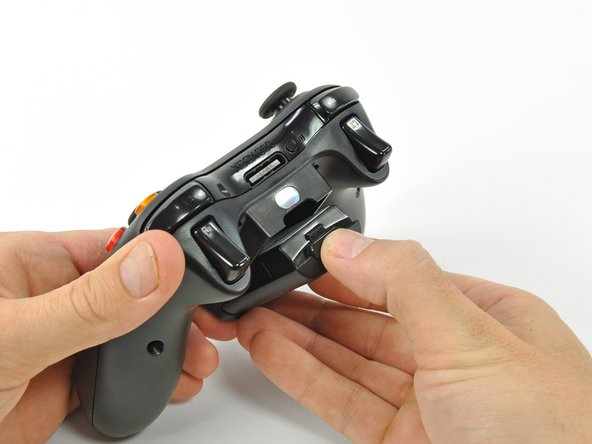
    • Depress the battery release button on the top of the controller.

    • Remove the battery holder from the controller.

    • The standard option for Xbox 360 Wireless Controllers Battery Packs is AA batteries. A rechargeable battery is also available, but both battery options are removed from the controller in the same way.

    Ask FixBot

    Add Comment

  2. Xbox 360 Wireless Controller battery holder spring Replacement, Sticker: step 2, image 1 of 1
    Tool used on this step:
    Tweezers
    $4.99
    Buy
    • Use a pair of tweezers to peel the barcode sticker from the battery compartment.

    Ask FixBot

    Add Comment

  3. Xbox 360 Wireless Controller battery holder spring Replacement, Back Screws: step 3, image 1 of 1
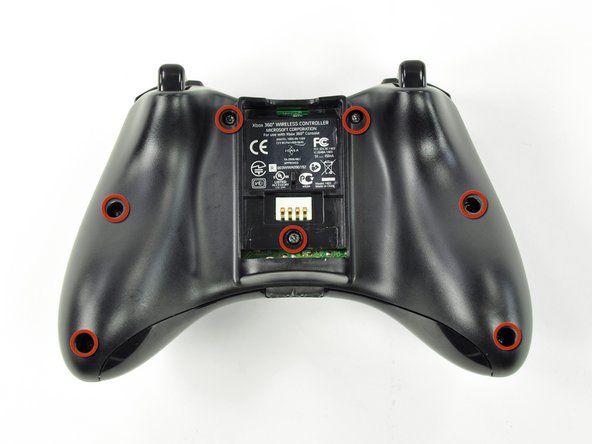
    • Remove the seven 9.3 mm T8 Security Torx screws securing the rear case to the front case.

    Ask FixBot

    Add Comment

  4. Xbox 360 Wireless Controller battery holder spring Replacement: step 4, image 1 of 2 Xbox 360 Wireless Controller battery holder spring Replacement: step 4, image 2 of 2
    Tool used on this step:
    Spudger
    $2.99
    Buy
    • Insert a spudger between the front and rear cases along the left edge of the controller.

    • Rotate the spudger toward the front of the controller, prying the two cases apart.

    Ask FixBot

    Add Comment

  5. Xbox 360 Wireless Controller battery holder spring Replacement: step 5, image 1 of 2 Xbox 360 Wireless Controller battery holder spring Replacement: step 5, image 2 of 2
    • Insert a spudger between the front and rear cases, near the headphone jack.

    • Rotate the spudger toward the front of the controller to pry the two cases apart.

    Ask FixBot

    Add Comment

  6. Xbox 360 Wireless Controller battery holder spring Replacement: step 6, image 1 of 2 Xbox 360 Wireless Controller battery holder spring Replacement: step 6, image 2 of 2
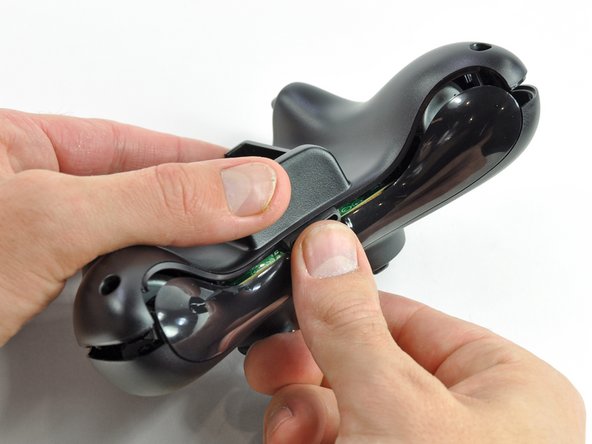
    • Grasp the controller by the battery compartment and the headphone jack.

    • Lift the battery compartment away from the headphone jack, separating the rear case from the front case and logic board.

    • The battery contact springs are held in place by slots in the battery housing in the rear case. Be sure to realign them properly during reassembly.

    Ask FixBot

    Add Comment

  7. Xbox 360 Wireless Controller battery holder spring Replacement, Vibration Motors: step 7, image 1 of 2 Xbox 360 Wireless Controller battery holder spring Replacement, Vibration Motors: step 7, image 2 of 2
    • Use the flat end of a spudger to remove the vibration motor cable, moving it upward from its socket on the logic board.

    • Lift the vibration motor out of the front case.

    Ask FixBot

    Add Comment

  8. Xbox 360 Wireless Controller battery holder spring Replacement: step 8, image 1 of 2 Xbox 360 Wireless Controller battery holder spring Replacement: step 8, image 2 of 2
    • Remove the vibration motor from the other side of the controller using the same method previously described.

    • The left motor has significantly more counterweight than the right motor.

    Ask FixBot

    Add Comment

  9. Xbox 360 Wireless Controller battery holder spring Replacement, Logic Board: step 9, image 1 of 2 Xbox 360 Wireless Controller battery holder spring Replacement, Logic Board: step 9, image 2 of 2
    • Lifting from the headphone jack and power plug, remove the logic board from the front case.

    Ask FixBot

    Add Comment

Conclusion

To reassemble your device, follow these instructions in reverse order.

Cancel: I did not complete this guide.

One other person completed this guide.

archer horst

Member since: 04/29/26

373 Reputation

2 Guides authored

0 Guide Comments

Add Comment

View Statistics:

Past 24 Hours: 0

Past 7 Days: 12

Past 30 Days: 26

All Time: 45