Introduction
There is no such thing as too much hard drive space, and nothing more frustrating than too little. This guide will show you how to replace your Xbox 360 S hard drive.
What you need
-
-
-
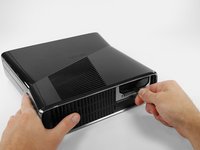
Push the latch holding down the hard drive cover to the left.
-
Pull the hard drive cover away from the console.
 Ask FixBot
-
-
-
-
Firmly grasp the fabric tab labeled with the size of the hard drive (e.g. "250 GB") attached to the hard drive.
-
Pull the hard drive straight out of the console.
-
-




To reassemble your device, follow these instructions in reverse order.
Cancel: I did not complete this guide.
112 other people completed this guide.


5 Guide Comments
do you have to transfer the OS? or data? if so what utility is used? do you need a data transfer cable?
Can I just add an external drive to supplement the existing HDD?
no the os is on the internal drive all the hard drive is doing is adding more storge space
My hardrive says its unformated but its not and i dont want to loose content
Can I take the external out of the little black cover?
Will it play backwards compatible games
