Free Shipping on Domestic Orders $75+

WowWee MiP Robot LED Light Replacement

What you need

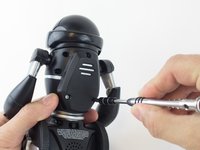
  1. WowWee MiP Robot LED Light Replacement, Battery: step 1, image 1 of 2 WowWee MiP Robot LED Light Replacement, Battery: step 1, image 2 of 2
    • Remove the three 12.0 mm Phillips # 2 screws from the battery cover.

    Ask FixBot

    Add Comment

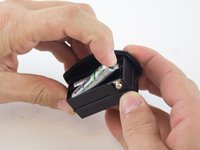
  2. WowWee MiP Robot LED Light Replacement: step 2, image 1 of 2 WowWee MiP Robot LED Light Replacement: step 2, image 2 of 2
    • Carefully pull the battery pack from the robot.

    • Remove the batteries from the battery pack.

    Ask FixBot

    Add Comment

  3. WowWee MiP Robot LED Light Replacement, Wheel: step 3, image 1 of 2 WowWee MiP Robot LED Light Replacement, Wheel: step 3, image 2 of 2
    • Use a metal spudger to carefully pry off the hubcap without marring the plastic wheel or hubcap.

    • This plastic material is not replaceable. Any damage will be noticeable.

    Ask FixBot

    Add Comment

  4. WowWee MiP Robot LED Light Replacement: step 4, image 1 of 2 WowWee MiP Robot LED Light Replacement: step 4, image 2 of 2
    • Remove the 12.0 mm Phillips #2 screw.

    • Hold the wheel in place, or it will rotate as you attempt to remove the screw.

    Ask FixBot

    Add Comment

  5. WowWee MiP Robot LED Light Replacement: step 5, image 1 of 1
    • Pull the wheel off of the square axle.

    • Do not use excessive force while removing the wheel. Pulling too hard on the wheel can damage the axle.

    Ask FixBot

    Add Comment

  6. WowWee MiP Robot LED Light Replacement, WowWee MiP Robot Body Disassembly: step 6, image 1 of 2 WowWee MiP Robot LED Light Replacement, WowWee MiP Robot Body Disassembly: step 6, image 2 of 2
    • Remove the eight 9.3 mm Phillips #1 screws from the back of the robot.

    Ask FixBot

    Add Comment

  7. WowWee MiP Robot LED Light Replacement: step 7, image 1 of 3 WowWee MiP Robot LED Light Replacement: step 7, image 2 of 3 WowWee MiP Robot LED Light Replacement: step 7, image 3 of 3
    • Remove the arms from the body.

    • Carefully open the body compartment.

    • Open the compartment slowly. There are wires connecting the two body pieces together. If pulled too hard, the wires and/or the motherboard could be damaged.

    Ask FixBot

    Add Comment

  8. WowWee MiP Robot LED Light Replacement: step 8, image 1 of 1
    Tool used on this step:
    Tweezers
    $4.99
    Buy
    • Using precision tweezers, disconnect the following three bundles of wires:

    • Connecting the battery pack to the motherboard.

    • Connecting the power switch to the motherboard.

    • Connecting the speaker to the motherboard.

    Ask FixBot

    Add Comment

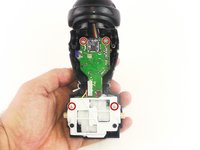
  9. WowWee MiP Robot LED Light Replacement, LED Light: step 9, image 1 of 2 WowWee MiP Robot LED Light Replacement, LED Light: step 9, image 2 of 2
    • Remove the four 7.5mm Phillips #1 screws.

    Ask FixBot

    Add Comment

  10. WowWee MiP Robot LED Light Replacement: step 10, image 1 of 2 WowWee MiP Robot LED Light Replacement: step 10, image 2 of 2
    • Carefully pull the motor and motherboard assembly straight out from the base.

    • Be careful not to break the plastic rods that go through the motor assembly and are connect to the shell.

    Ask FixBot

    Add Comment

  11. WowWee MiP Robot LED Light Replacement: step 11, image 1 of 1
    Tool used on this step:
    Tweezers
    $4.99
    Buy
    • Use the precision tweezers to unplug the bundle of wires.

    Ask FixBot

    Add Comment

  12. WowWee MiP Robot LED Light Replacement: step 12, image 1 of 1
    • Slide the head back to separate it from the body.

    • The motherboard does not need to be separated from the head to replace the LED light.

    Ask FixBot

    Add Comment

  13. WowWee MiP Robot LED Light Replacement: step 13, image 1 of 1
    • Remove the 7.5mm Phillips #1 screw.

    • The LED light is soldered to the small circuit board.

    Ask FixBot

    Add Comment

Conclusion

To reassemble your device, follow these instructions in reverse order.

Cancel: I did not complete this guide.

One other person completed this guide.

Courtney

Member since: 02/04/16

236 Reputation

1 Guide authored

Team

USF Tampa, Team 3-4, Wollert Spring 2016 Member of USF Tampa, Team 3-4, Wollert Spring 2016

USFT-WOLLERT-S16S3G4

4 Members

10 Guides authored

0 Guide Comments

Add Comment

View Statistics:

Past 24 Hours: 1

Past 7 Days: 8

Past 30 Days: 39

All Time: 1,032