Free Shipping on Domestic Orders $75+

This translation was generated by a machine and has not been reviewed by a person yet. Speak this language? Review it.

Why! NV41MZ Left Speaker Replacement

What you need

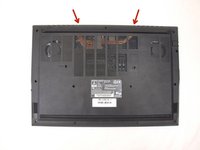
    1. Why! NV41MZ Left Speaker Replacement, Bottom Cover: step 1, image 1 of 3 Why! NV41MZ Left Speaker Replacement, Bottom Cover: step 1, image 2 of 3 Why! NV41MZ Left Speaker Replacement, Bottom Cover: step 1, image 3 of 3
      • Remove the 14 screws securing the bottom case to the laptop.

      • Unclip the case by sliding a plastic spudger into the slots in the case.

      • Remove the bottom case.

      Ask FixBot

      Add Comment

    1. Why! NV41MZ Left Speaker Replacement, Left speaker: step 2, image 1 of 2 Why! NV41MZ Left Speaker Replacement, Left speaker: step 2, image 2 of 2
      • Unscrew the 2 screws.

      • Unplug the cable.

      • Remove the speaker

      Ask FixBot

      Add Comment

Conclusion

To reassemble your device, follow the instructions in reverse order.

Cancel: I did not complete this guide.

Special thanks to these translators:

fr en

100%

Mahdi Jahani is helping us fix the world! Want to contribute?
Start translating ›

Felice Suglia

Member since: 06/15/13

33,634 Reputation

283 Guides authored

0 Guide Comments

Add Comment

View Statistics:

Past 24 Hours: 1

Past 7 Days: 9

Past 30 Days: 51

All Time: 301