Free Shipping on Domestic Orders $75+

Whirlpool #WTW5000DW Drive Belt Replacement

What you need

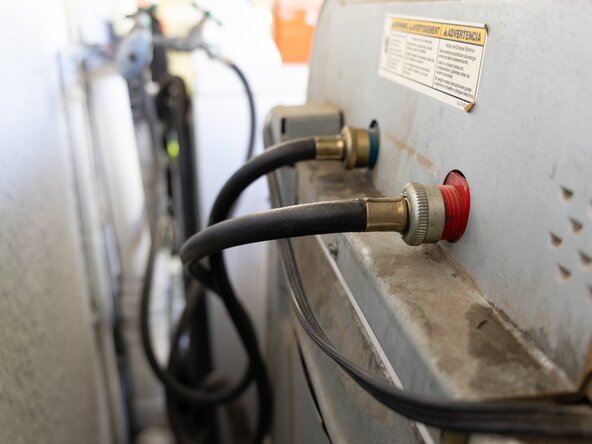
  1. Whirlpool #WTW5000DW Drive Belt Replacement, Drive Belt Whirlpool Washer: step 1, image 1 of 3 Whirlpool #WTW5000DW Drive Belt Replacement, Drive Belt Whirlpool Washer: step 1, image 2 of 3 Whirlpool #WTW5000DW Drive Belt Replacement, Drive Belt Whirlpool Washer: step 1, image 3 of 3
    • Before performing any repairs or replacements, please be aware of your surroundings and ensure you have plenty of safe space to work.

    • Cut the washing machine's water and power before beginning.

    • There will be two valves: one for hot water and one for cold water. Don't forget to unplug the electricity as well.

  2. Whirlpool #WTW5000DW Drive Belt Replacement: step 2, image 1 of 1
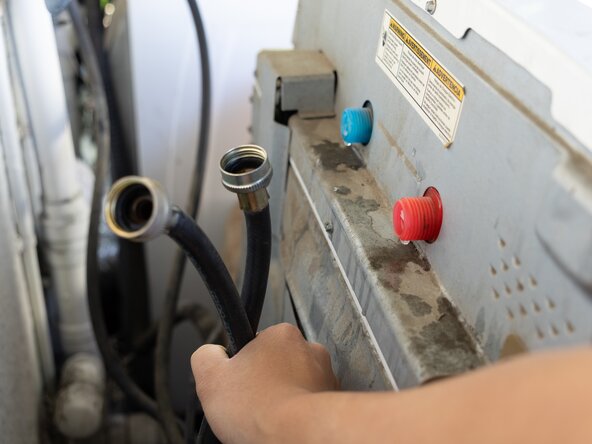
    • Follow the water line to your washer.

  3. Whirlpool #WTW5000DW Drive Belt Replacement: step 3, image 1 of 3 Whirlpool #WTW5000DW Drive Belt Replacement: step 3, image 2 of 3 Whirlpool #WTW5000DW Drive Belt Replacement: step 3, image 3 of 3
    • Unplug both water lines.

    • Mark which one is for hot water and which is for cold water.

  4. Whirlpool #WTW5000DW Drive Belt Replacement: step 4, image 1 of 1
    • Safely lower the washing machine; it may contain small amounts of water. Just in case, have a towel ready.

    • Then, with your nut-driver remove the metal backing of the washing machine.

  5. Whirlpool #WTW5000DW Drive Belt Replacement: step 5, image 1 of 2 Whirlpool #WTW5000DW Drive Belt Replacement: step 5, image 2 of 2
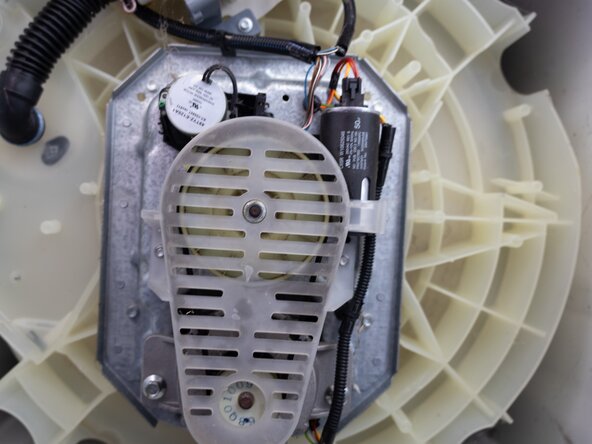
    • Go to the back of the washing machine; you will find the main panel for the drive belt, which is located behind a clear plastic lid.

  6. Whirlpool #WTW5000DW Drive Belt Replacement: step 6, image 1 of 3 Whirlpool #WTW5000DW Drive Belt Replacement: step 6, image 2 of 3 Whirlpool #WTW5000DW Drive Belt Replacement: step 6, image 3 of 3
    • Use the 5/16" Nut Driver to unplug both of the 5/16" hex bolt screw on both sides of the lid and then take the lid out.

  7. Whirlpool #WTW5000DW Drive Belt Replacement: step 7, image 1 of 3 Whirlpool #WTW5000DW Drive Belt Replacement: step 7, image 2 of 3 Whirlpool #WTW5000DW Drive Belt Replacement: step 7, image 3 of 3
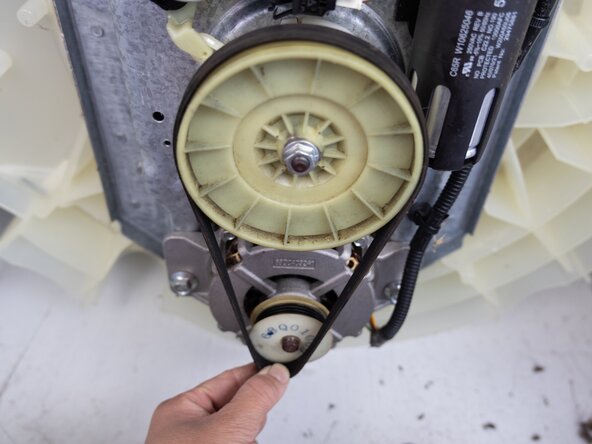
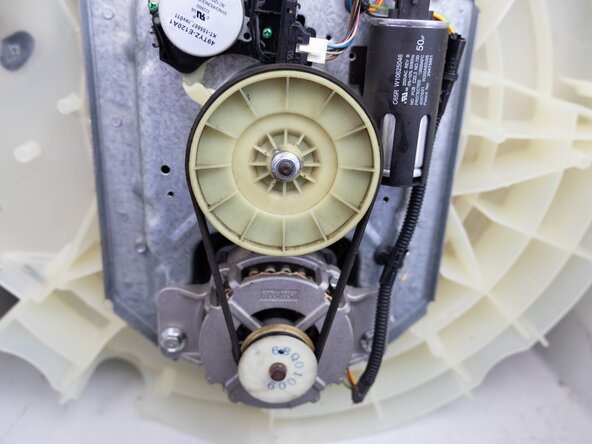
    • After removing the lid, you will find the drive belt of the washing machine.

    • Pull the belt out slowly; it's designed to fit tightly, so this may be difficult.

  8. Whirlpool #WTW5000DW Drive Belt Replacement: step 8, image 1 of 2 Whirlpool #WTW5000DW Drive Belt Replacement: step 8, image 2 of 2
    • Use a brush or towel to clean the wheel where the belt was.

  9. Whirlpool #WTW5000DW Drive Belt Replacement: step 9, image 1 of 3 Whirlpool #WTW5000DW Drive Belt Replacement: step 9, image 2 of 3 Whirlpool #WTW5000DW Drive Belt Replacement: step 9, image 3 of 3
    • Put the new drive belt on, make sure the smooth side faces away from the wheel, and the side with many lines faces toward the wheel.

    • It's essential because the belt needs grip to spin the washer.

  10. Whirlpool #WTW5000DW Drive Belt Replacement: step 10, image 1 of 3 Whirlpool #WTW5000DW Drive Belt Replacement: step 10, image 2 of 3 Whirlpool #WTW5000DW Drive Belt Replacement: step 10, image 3 of 3
    • Reinstall the lid and screw in the two 5/16" hex bolts back in.

  11. Whirlpool #WTW5000DW Drive Belt Replacement: step 11, image 1 of 1
    • Make sure everything is back to the original stage before lifting the washing machine back on. The back and lid should be the only two components you altered here.

  12. Whirlpool #WTW5000DW Drive Belt Replacement: step 12, image 1 of 3 Whirlpool #WTW5000DW Drive Belt Replacement: step 12, image 2 of 3 Whirlpool #WTW5000DW Drive Belt Replacement: step 12, image 3 of 3
    • Plug the water line back in and the electricity—hot water for the hot water line, and the same for cold water before turning it back on.

  13. Whirlpool #WTW5000DW Drive Belt Replacement: step 13, image 1 of 1
    • Congratulations, you have finished replacing the washing machine drive belt!

Conclusion

To reassemble your appliance, simply follow these instructions in reverse.

One other person completed this guide.

Khanh Le

Member since: 09/25/25

709 Reputation

2 Guides authored

0 Guide Comments

Add Comment

View Statistics:

Past 24 Hours: 0

Past 7 Days: 25

Past 30 Days: 147

All Time: 607