
Wexford CT-166TF Plastic Casing Replacement

Cameron Mattson and 3 other contributors
Last updated on Aug 2, 2019
Views: 820
View statistics:
- Past 24 Hours:
- 3
- Past 7 Days:
- 19
- Past 30 Days:
- 93
- All Time:
- 820
Comments: 0
No one has left comments on this guide. Will you be first?
Go to guide commentsCompleted: 2 3
2 people have marked this guide "completed." Will you be next?
3 people have marked this guide "completed." Including you — great job!
Favorites: 0 1
No one has favorited (and subscribed to) this guide. Will you be the first?
1 person has favorited (and subscribed to) this guide — and that's you!
Introduction
Go to step 1 ↓This guide will show you how to remove the plastic casing so that it can be replaced.
What you need
Tools
-
Spudger4.9
-


-
-
-
Remove the knob by gripping it and pulling straight up. Use a spudger if it is difficult to grip.
-
-
-
-
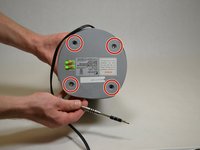
Using the plastic opening tool, turn the device over and remove the black plastic covers over the four screw holes.
-
-
-
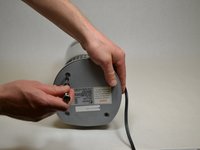
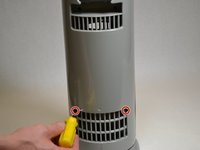
Remove 5 smaller screws visible through small holes between the base and the casing.
-
-
-
-
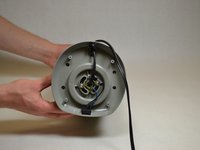
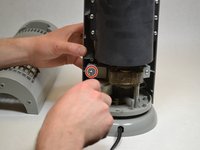
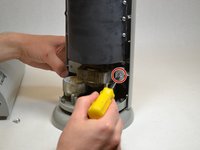
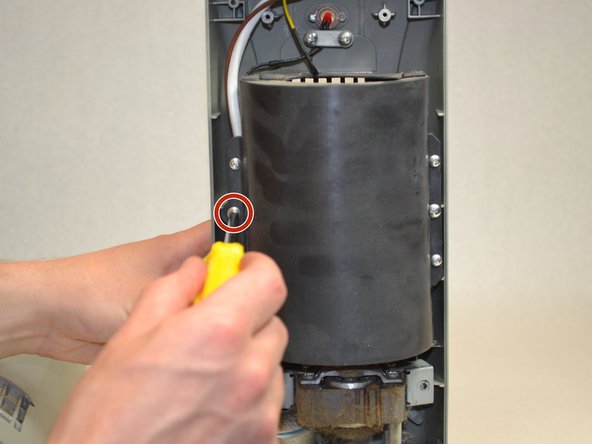
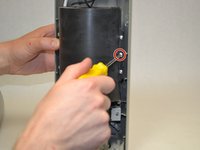
Remove the two middle screws attaching the black plastic cover to the front .
-
-
-
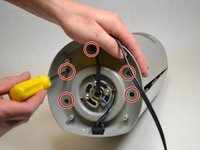
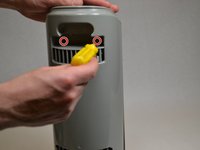
Remove the two screws attached to the white bar near the red light on the top of the front casing.
-
-

 Ask FixBot











To reassemble your device, follow these instructions in reverse order.
Cancel: I did not complete this guide.
2 other people completed this guide.

Team

UW Tacoma, Team S3-G4, Liner Spring 2017 Member of UW Tacoma, Team S3-G4, Liner Spring 2017
UWT-LINER-S17S3G4
4 Members
36 Guides authored
