
Watch Battery Replacement

Maria Pina and 6 other contributors
Last updated on Apr 27, 2026
Views: 3.6K
View statistics:
- Past 24 Hours:
- 7
- Past 7 Days:
- 53
- Past 30 Days:
- 201
- All Time:
- 3,564
Comments: 0
No one has left comments on this guide. Will you be first?
Go to guide commentsCompleted: 5 6
5 people have marked this guide "completed." Will you be next?
6 people have marked this guide "completed." Including you — great job!
Favorites: 7 8
7 people have favorited (and subscribed to) this guide. Will you be next?
8 people have favorited (and subscribed to) this guide — including you!
Needs More Images
A few more images would make this guide's procedures crystal clear.
Introduction
Go to step 1 ↓For this project, we are going to talk about how to replace a battery in a traditional watch. These instructions will only work for a traditional screw-off-back watch. To complete this task, you do not need any prior experience, but you will need to have a basic understanding of tools. By doing this yourself, you will save money and gain basic knowledge about watch repair. Make sure you are in a well-lit area with plenty of space.
What you need
Parts
Tools

-
-
-
Place your watch in the watch holder, and adjust the sizing screw to the appropriate size for your watch.
 Ask FixBot
-
-
-
Next, you will have to adjust the dimensions of the watch back remover tool you will use to take the watch back off. The dimensions should be set so the tool properly fits the three connection points on the back of the watch. You can do this by screwing or unscrewing the adjustment screws on the tool.
-
-
-
Turn the tool counterclockwise until the back of the watch is completely off.
-
-
Tool used on this step:Tweezers$4.99
-
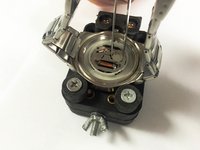
Use tweezers to carefully remove the current watch battery. Next, place the new battery in the same spot and orientation you removed the previous battery from.
-
-
-
-
Place the back of the watch back on and align the watch back remover tool to the three connection points. Then, turn the tool clockwise until the back of the watch is tightly secured.
-
-




To reassemble your device, follow these instructions in reverse order.
Cancel: I did not complete this guide.
5 other people completed this guide.

Team

Sam Houston State, Team 15-2, Nardone Fall 2015 Member of Sam Houston State, Team 15-2, Nardone Fall 2015
SHSU-NARDONE-F15S15G2
5 Members
12 Guides authored
