Free Shipping on Domestic Orders $75+

Wahl Chrome Pro Power Cord Replacement

What you need

    1. Wahl Chrome Pro Power Cord Replacement, Case: step 1, image 1 of 1
      • Remove the two 5.0 mm JIS #1 screws to loosen the cutting blades.

      • Make sure your device is not connected to power before you begin.

      Ask FixBot

      Add Comment

    2. Wahl Chrome Pro Power Cord Replacement: step 2, image 1 of 1
      • Lift the bottom blade straight up from the device body to remove it.

      Ask FixBot

      Add Comment

    3. Wahl Chrome Pro Power Cord Replacement: step 3, image 1 of 1
      • Remove the three 9.0 mm JIS #1 screws attaching the base of the blade assembly to the body.

      Ask FixBot

      Add Comment

    4. Wahl Chrome Pro Power Cord Replacement: step 4, image 1 of 1
      • Lift the base of blade assembly straight up off of the body.

      Ask FixBot

      Add Comment

    5. Wahl Chrome Pro Power Cord Replacement: step 5, image 1 of 1
      • Remove the two 12.0 mm JIS #1 screws on the back of the device body.

      Ask FixBot

      Add Comment

    6. Wahl Chrome Pro Power Cord Replacement: step 6, image 1 of 1
      • Remove the 13.0 mm Phillips #2 screw on the side of the device body.

      • This screw is located on the opposite side of the body from the switch.

      Ask FixBot

      Add Comment

    7. Wahl Chrome Pro Power Cord Replacement: step 7, image 1 of 1
      Tool used on this step:
      Tweezers
      $4.99
      Buy
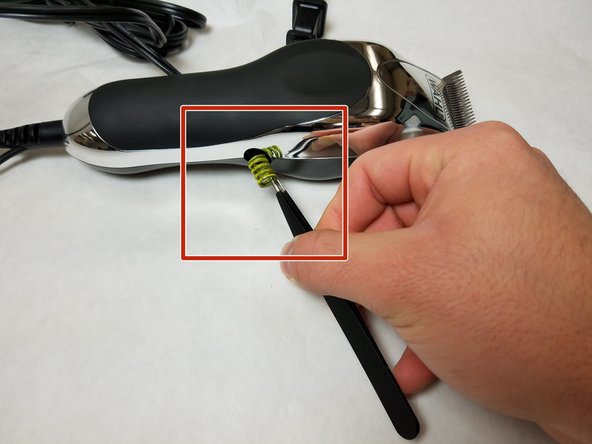
      • Remove the spring on the side of the body using tweezers.

      Ask FixBot

      Add Comment

    8. Wahl Chrome Pro Power Cord Replacement: step 8, image 1 of 1
      • Pry the body case off of the device using a spudger.

      Ask FixBot

      Add Comment

    1. Wahl Chrome Pro Power Cord Replacement, Power Cord: step 9, image 1 of 2 Wahl Chrome Pro Power Cord Replacement, Power Cord: step 9, image 2 of 2
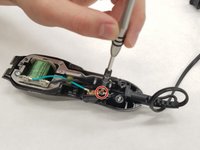
      • Remove one 7.5 mm JIS #1 screw from the switch base.

      Ask FixBot

      Add Comment

    2. Wahl Chrome Pro Power Cord Replacement: step 10, image 1 of 1
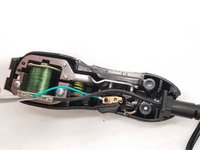
      • Unplug the cord terminal from the motor connector.

      Ask FixBot

      Add Comment

    3. Wahl Chrome Pro Power Cord Replacement: step 11, image 1 of 1
      • Remove the cord from the device base by pulling gently.

      Ask FixBot

      Add Comment

Conclusion

To reassemble your device, follow these instructions in reverse order.

Cancel: I did not complete this guide.

One other person completed this guide.

Manuel Salazar M.

Member since: 11/07/17

113 Reputation

1 Guide authored

Team

IUPUI, Team S7-G3, Baechle Fall 2017 Member of IUPUI, Team S7-G3, Baechle Fall 2017

IUPUI-BAECHLE-F17S7G3

3 Members

48 Guides authored

0 Guide Comments

Add Comment

View Statistics:

Past 24 Hours: 8

Past 7 Days: 19

Past 30 Days: 40

All Time: 1,398