
Wahl Chrome Pro Power Case Guide

Ashley Dale and 4 other contributors
Last updated on May 7, 2024
Views: 1.8K
View statistics:
- Past 24 Hours:
- 3
- Past 7 Days:
- 14
- Past 30 Days:
- 113
- All Time:
- 1,765
Comments: 0
No one has left comments on this guide. Will you be first?
Go to guide commentsCompleted: 2 3
2 people have marked this guide "completed." Will you be next?
3 people have marked this guide "completed." Including you — great job!
Favorites: 0 1
No one has favorited (and subscribed to) this guide. Will you be the first?
1 person has favorited (and subscribed to) this guide — and that's you!
Introduction
Go to step 1 ↓The Wahl Chrome Pro components are protected by an outer plastic body held together by several screws. This guide provides information on how to remove the outer protective case to access various internal components.
What you need
Tools
-
-
Spudger4.9
-


-
-
-
Remove the three 9.0 mm JIS #1 screws attaching the base of the blade assembly to the body.
-
-
-
Remove the 13.0 mm Phillips #2 screw on the side of the device body.
-
This screw is located on the opposite side of the body from the switch.
-
-
-
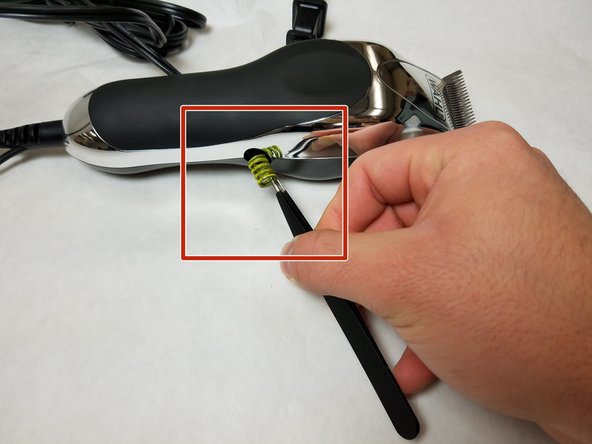
Tool used on this step:Tweezers$4.99
-
Remove the spring on the side of the body using tweezers.
-

 Ask FixBot



To reassemble your device, follow these instructions in reverse order.
Cancel: I did not complete this guide.
2 other people completed this guide.

Team

IUPUI, Team S7-G3, Baechle Fall 2017 Member of IUPUI, Team S7-G3, Baechle Fall 2017
IUPUI-BAECHLE-F17S7G3
3 Members
48 Guides authored
