Free Shipping on Domestic Orders $75+

Vtech Kidizoom Smart Watch DX Buttons Replacement

What you need

  1. Vtech Kidizoom Smart Watch DX Buttons Replacement, Master Switch: step 1, image 1 of 1
    • Make sure the master switch is "OFF" before disassembly, to avoid an electric shock.

    • Flip the watch over with the back facing up.

    Ask FixBot

    Add Comment

  2. Vtech Kidizoom Smart Watch DX Buttons Replacement: step 2, image 1 of 1
    • Remove the four 6.0 mm screws on the back plate with the Phillips #00 screwdriver.

    Ask FixBot

    Add Comment

  3. Vtech Kidizoom Smart Watch DX Buttons Replacement: step 3, image 1 of 1
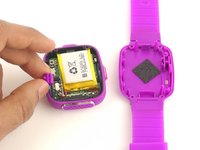
    • Gently pull the back plate from the watch casing.

    Ask FixBot

    Add Comment

  4. Vtech Kidizoom Smart Watch DX Buttons Replacement: step 4, image 1 of 2 Vtech Kidizoom Smart Watch DX Buttons Replacement: step 4, image 2 of 2
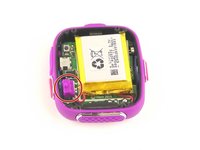
    • Lift the master switch from the circuit board.

    Ask FixBot

    Add Comment

  5. Vtech Kidizoom Smart Watch DX Buttons Replacement, Circuit Board: step 5, image 1 of 2 Vtech Kidizoom Smart Watch DX Buttons Replacement, Circuit Board: step 5, image 2 of 2
    • The speaker wires are fragile. They may break if excessive force is used to remove the circuit board.

    • Removal of the circuit board requires soldering.

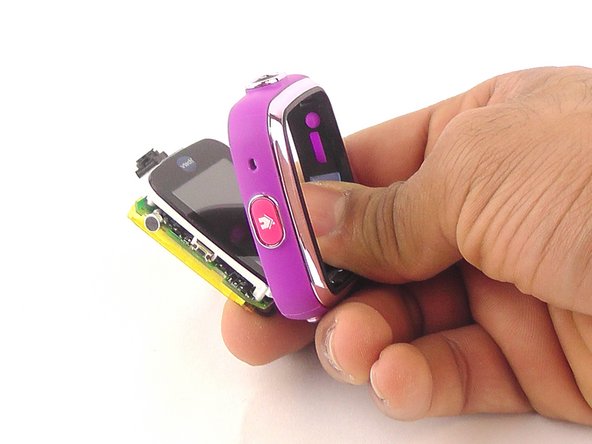
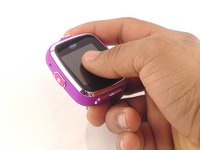
    • Gently push on the display from the front, near the camera. The circuit board and display will pop out through the back.

    Ask FixBot

    Add Comment

  6. Vtech Kidizoom Smart Watch DX Buttons Replacement: step 6, image 1 of 1
    • Lift the circuit board carefully from the casing, without breaking or detaching the speaker wires at the bottom of the circuit board.

    Ask FixBot

    Add Comment

  7. Vtech Kidizoom Smart Watch DX Buttons Replacement: step 7, image 1 of 1
    • Note which wire is connected to which lead before continuing. There are no markers on the circuit board to indicate where each wire belongs.

    • De-solder the black speaker wire from the circuit board.

    Ask FixBot

    Add Comment

  8. Vtech Kidizoom Smart Watch DX Buttons Replacement: step 8, image 1 of 1
    • De-solder the red speaker wire, as in the previous step.

    Ask FixBot

    Add Comment

  9. Vtech Kidizoom Smart Watch DX Buttons Replacement: step 9, image 1 of 1
    • Wait for the solder to cool down and solidify, then remove the circuit board from the casing.

    Ask FixBot

    Add Comment

  10. Vtech Kidizoom Smart Watch DX Buttons Replacement, Buttons: step 10, image 1 of 1
    Tool used on this step:
    Tweezers
    $4.99
    Buy
    • Use the the tweezers to pull off the blue rubber cover behind the button.

    • The blue cover is adhesive, so you can stick it back onto the back of the buttons after replacement.

    Ask FixBot

    Add Comment

  11. Vtech Kidizoom Smart Watch DX Buttons Replacement: step 11, image 1 of 1
    • Use tweezers to separate the backside tab from the front side of the button.

    Ask FixBot

    Add Comment

  12. Vtech Kidizoom Smart Watch DX Buttons Replacement: step 12, image 1 of 1
    • Push the other half of the button out of the casing.

    • Repeat steps 11 and 12 for all buttons.

    Ask FixBot

    Add Comment

Conclusion

To reassemble your device, follow these instructions in reverse order.

Cancel: I did not complete this guide.

2 other people completed this guide.

Mohammed Alyaarubi

Member since: 01/20/16

365 Reputation

1 Guide authored

Team

USF Tampa, Team 10-6, Remmell Spring 2016 Member of USF Tampa, Team 10-6, Remmell Spring 2016

USFT-REMMELL-S16S10G6

4 Members

12 Guides authored

1 Guide Comment

Where can you buy the replacement cover?

Katrina Nullatamby - Reply Share

Add Comment

View Statistics:

Past 24 Hours: 1

Past 7 Days: 7

Past 30 Days: 54

All Time: 6,498