
Vtech InnoTab 3S Microphone Replacement

Last updated on Nov 15, 2026
Views: 814
View statistics:
- Past 24 Hours:
- 1
- Past 7 Days:
- 3
- Past 30 Days:
- 101
- All Time:
- 814
Comments: 0
No one has left comments on this guide. Will you be first?
Go to guide commentsCompleted: 0 1
No one has marked this guide "completed." Will you be the first?
1 person has marked this guide "completed." It's you — great job!
Favorites: 0 1
No one has favorited (and subscribed to) this guide. Will you be the first?
1 person has favorited (and subscribed to) this guide — and that's you!
Student In Progress
This guide is being worked on by hardworking students.
Markup Mishap
This guide needs better markups. Help out by correcting or making some markup annotations.
Better Introduction
Improve this guide by completing or revising its introduction.
What you need
Tools


Introduction
Go to step 1 ↓Your Vtech Inno Tab 3S is an educational Wi-Fi learning tablet for kids 3-9 years of age. The built-in microphone records audio and enables voice-and sound-activated gameplay across learning games and apps. If the microphone is not working, you can perform a few quick troubleshooting steps, shown in the VTech InnoTab 3S User Manual.
If the microphone is still not working after troubleshooting, the iFixit VTech InnoTab 3S Repair Page will allow you to see the exact screw and component layout before you begin. In addition, this guide will walk you through removing and replacing the tablet microphone.
Before starting, always power off and unplug your device to avoid any electrical hazards.
-
-
-
While holding the battery compartment locks down, slide the two battery doors outwards from the sides of the device.
-
Remove the batteries from the device.
 Ask FixBot
-
-
-
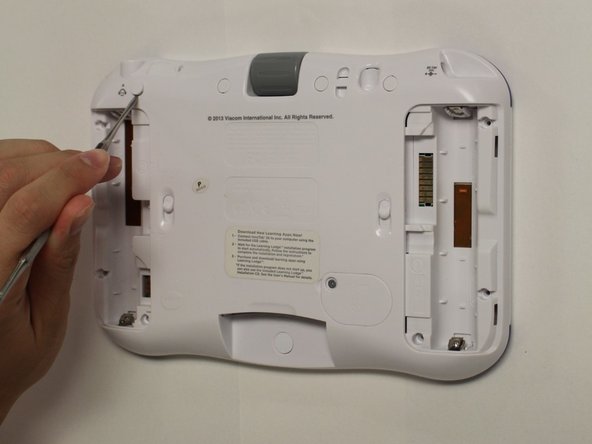
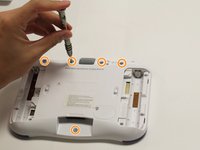
Using a nylon spudger, remove the five caps that hide the screws.
-
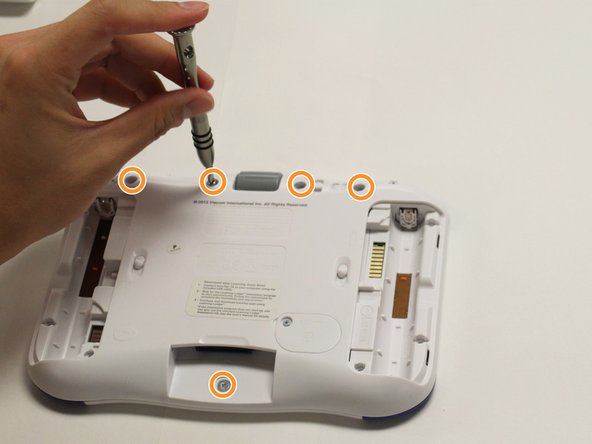
Remove the five 5 mm screws from the rear panel of the device, using a Phillips #1 screwdriver.
-
-
-
Remove the six 7 mm screws from the interior battery compartment using a Phillips #1 screwdriver.
-
-
-
-
-
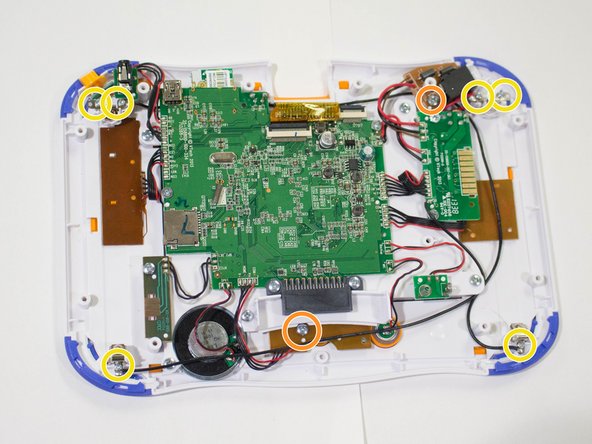
Remove the six screws that secure the motherboard to the front panel of the device using a Phillips #1 screwdriver.
-
Next, remove the two 5 mm screws that secure the charger port (upper right and bottom center).
-
Then, remove the six 3 mm screws securing the battery clip.
-
-
Tool used on this step:Tweezers$4.99
-
Using the tweezers, remove the battery clips from each corner (four total) of the Vtech InnoTab 3s.
-
With the tweezers, detached the charging port, headphone port, and the light switch button from the front panel of the device.
-
-
-
-
Tool used on this step:Tweezers$4.99
-
Solder the prongs to unsecure the microphone from the device.
-
Using the tweezers carefully remove the microphone from the device.
-
-






To reassemble your device, follow these instructions in reverse order.

Team

USF Tampa, Team 8-2, Eyestone Fall 2015 Member of USF Tampa, Team 8-2, Eyestone Fall 2015
USFT-EYESTONE-F15S8G2
4 Members
108 Guides authored
