Introduction
You will use your hands to remove the power source of the notebook. A very simple task to complete.
-
-
-
Place the notebook on the table, with the battery facing away from you.
-
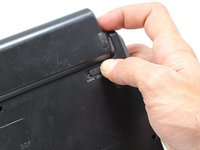
Slide the switch from "lock" to "unlock" with your right hand on the right side of the computer.
-
Maintain holding the right switch in the "unlock" position.
-
Use your left hand to slide the left switch from "lock" to "unlock".
 Ask FixBot
-
-
-
-
Maintain both left and right switches in the "unlock" position.
-
Use your forefingers to push the battery out of the computer.
-
-




To reassemble your device, follow these instructions in reverse order.

Team

Cal Poly, Team 14-9, Forte Fall 2013 Member of Cal Poly, Team 14-9, Forte Fall 2013
CPSU-FORTE-F13S14G9
5 Members
60 Guides authored
