Introduction
This is a guide for replacing the battery of the Velocity Micro Cruz T301.
This guide shows how to take off the back panel and remove the battery. After replacing the battery, the device will need to be reassembled in the opposite order.
The battery powers the tablet and may need to be replaced if the device will not turn on. The tablet will also need to be replaced if it does not hold a charge.
If the battery seems to be damaged or swollen, use this guide to safely remove the battery.
Make sure that the device is turned off before using this guide.
What you need
-
-
-
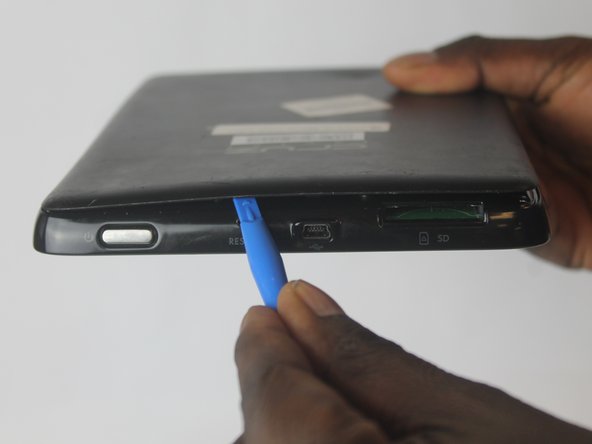
Insert the plastic iFixit opening tool into the SD port. Orient the iFixit opening tool so that the edge faces the rear panel.
 Ask FixBot
-
-
-
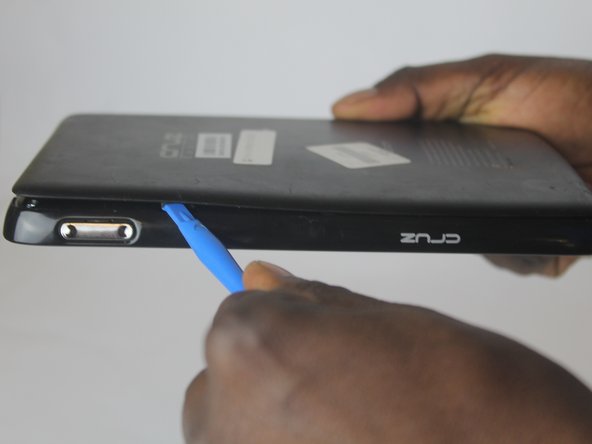
Use the iFixit opening tools to pry open a gap between the tablet and rear panel.
-
-
-
-
Remove the four screws in the metal battery housing using the Phillips #0 screwdriver.
-
-




To reassemble your device, follow these instructions in reverse order.
Cancel: I did not complete this guide.
One other person completed this guide.

Team

USF Tampa, Team 1-6, Cagle Fall 2016 Member of USF Tampa, Team 1-6, Cagle Fall 2016
USFT-CAGLE-F16S1G6
3 Members
60 Guides authored
