Free Shipping on Domestic Orders $75+

VTechCS6719-16 Speaker Replacement

What you need

    1. VTechCS6719-16 Speaker Replacement, Speaker: step 1, image 1 of 1
      • Remove the sliding cover on the back of the phone case.

      Ask FixBot

      Add Comment

    2. VTechCS6719-16 Speaker Replacement: step 2, image 1 of 1
      • Now remove the battery by lifting it and removing the two pin cable.

      Ask FixBot

      Add Comment

    3. VTechCS6719-16 Speaker Replacement: step 3, image 1 of 1
      • Unscrew the two 10mm screws on the back of the phone base.

      Ask FixBot

      Add Comment

    4. VTechCS6719-16 Speaker Replacement: step 4, image 1 of 1
      • Using the metal spudger edge along the phone and locate the hooks and latches.

      • Locating each of them apply a light but firm lifting force to release the front and back case.

      Ask FixBot

      Add Comment

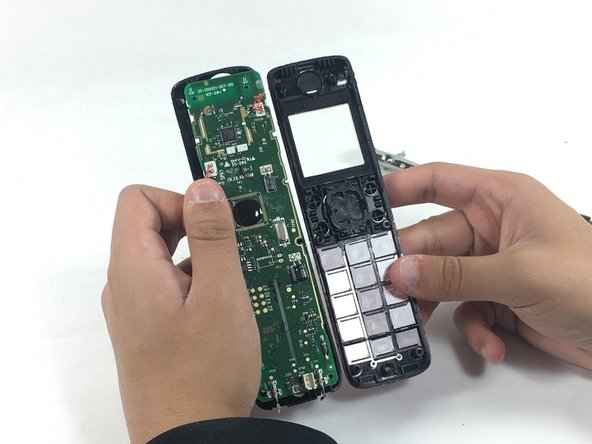
    5. VTechCS6719-16 Speaker Replacement: step 5, image 1 of 1
      • The front case should now be freed.

      • Put the front case aside for later.

      Ask FixBot

      Add Comment

    6. VTechCS6719-16 Speaker Replacement: step 6, image 1 of 1
      • There are two 10mm screws located at the top of the circuit board.

      • Unscrewing the screws allows for access to the speaker.

      Ask FixBot

      Add Comment

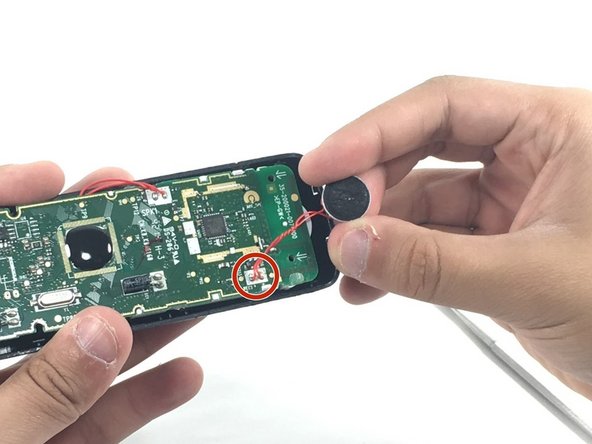
    7. VTechCS6719-16 Speaker Replacement: step 7, image 1 of 1
      • Flipping the circuit board will expose the speaker rested in the white LCD base.

      • Gently using the scoop end of the spudger will free the speaker from the dock.

      • Careful not to jerk the speaker as it is still attached to the board.

      Ask FixBot

      Add Comment

    8. VTechCS6719-16 Speaker Replacement: step 8, image 1 of 1
      • The last portion of this will require soldering skills. Simply solder the speaker from the board and replace with desired speaker.

      • If this is your first time soldering, check out this useful soldering guide.

      Ask FixBot

      Add Comment

Conclusion

To reassemble your device, follow these instructions in reverse order.

Cancel: I did not complete this guide.

Charles montes

Member since: 10/20/16

513 Reputation

5 Guides authored

Team

UMass Dartmouth, Team 5-5, Martin Fall 2016 Member of UMass Dartmouth, Team 5-5, Martin Fall 2016

UMASSD-MARTIN-F16S5G5

3 Members

60 Guides authored

0 Guide Comments

Add Comment

View Statistics:

Past 24 Hours: 0

Past 7 Days: 1

Past 30 Days: 29

All Time: 514