Free Shipping on Domestic Orders $75+

VTech CS6719-2 Screen Replacement

Views: 716

View statistics:

Past 24 Hours:
3
Past 7 Days:
15
Past 30 Days:
96
All Time:
716
Comments: 0

No one has left comments on this guide. Will you be first?

Go to guide comments
Completed: 0

No one has marked this guide "completed." Will you be the first?

Favorites: 0

No one has favorited (and subscribed to) this guide. Will you be the first?

Time Required: 7 minutes
Difficulty: Moderate
Missing Steps

Oops! This guide is currently missing one or more important steps.

VTech CS6719-2  Screen Replacement

Introduction

Go to step 1 ↓

During this guide, the back of the phone and the circuit board will need to be taken off to access the plastic screen.

What you need

Tools

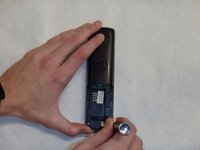
    1. VTech CS6719-2  Screen Replacement, Battery: step 1, image 1 of 2 VTech CS6719-2  Screen Replacement, Battery: step 1, image 2 of 2
      • Push down on the battery cover in the direction of the arrow located on the back of the phone.

      Ask FixBot

      Add Comment

    2. VTech CS6719-2  Screen Replacement: step 2, image 1 of 1
      • Pull the battery cover off of the back of the phone.

      Ask FixBot

      Add Comment

    3. VTech CS6719-2  Screen Replacement: step 3, image 1 of 1
      • Unplug the battery input cable.

      Ask FixBot

      Add Comment

    4. VTech CS6719-2  Screen Replacement: step 4, image 1 of 1
      • Lift the battery out of the back of the phone.

      Ask FixBot

      Add Comment

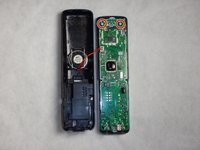
    1. VTech CS6719-2  Screen Replacement, Circuit Board: step 5, image 1 of 2 VTech CS6719-2  Screen Replacement, Circuit Board: step 5, image 2 of 2
      • Remove the two 9mm screws on the back side with a Phillips #0 screwdriver.

      Ask FixBot

      Add Comment

    2. VTech CS6719-2  Screen Replacement: step 6, image 1 of 1
      • Use the plastic opening tool and spudger to pry the back side of the phone off.

      Ask FixBot

      Add Comment

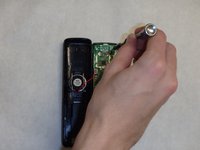
    3. VTech CS6719-2  Screen Replacement: step 7, image 1 of 2 VTech CS6719-2  Screen Replacement: step 7, image 2 of 2
      • Remove the two 9mm screws located inside the back cover at the top.

      Ask FixBot

      Add Comment

    1. VTech CS6719-2  Screen Replacement, Screen: step 8, image 1 of 1
      • Remove the plastic screen.

      Ask FixBot

      Add Comment

Conclusion

To reassemble your device, follow these instructions in reverse order.

Cancel: I did not complete this guide.

Joshua Woodward

Member since: 02/08/16

122 Reputation

1 Guide authored

Team

IUPUI, Team 1-4, Baechle Spring 2016 Member of IUPUI, Team 1-4, Baechle Spring 2016

IUPUI-BAECHLE-S16S1G4

4 Members

96 Guides authored

0 Guide Comments

Add Comment

View Statistics:

Past 24 Hours: 3

Past 7 Days: 15

Past 30 Days: 96

All Time: 716