Free Shipping on Domestic Orders $75+

Turtle Beach Stealth Ultra Bumpers Replacement

What you need

  1. Turtle Beach Stealth Ultra Bumpers Replacement, Back Plate: step 1, image 1 of 2 Turtle Beach Stealth Ultra Bumpers Replacement, Back Plate: step 1, image 2 of 2
    • Use tweezers to pull out rubber pieces in front of the screws.

  2. Turtle Beach Stealth Ultra Bumpers Replacement: step 2, image 1 of 2 Turtle Beach Stealth Ultra Bumpers Replacement: step 2, image 2 of 2
    • Remove the 10 mm screws using a Phillips #00 screwdriver.

  3. Turtle Beach Stealth Ultra Bumpers Replacement: step 3, image 1 of 2 Turtle Beach Stealth Ultra Bumpers Replacement: step 3, image 2 of 2
    • Remove the sticker on the back of the plate.

    • Remove the 10 mm screws from the back plate using a Phillips #00 screwdriver.

  4. Turtle Beach Stealth Ultra Bumpers Replacement: step 4, image 1 of 3 Turtle Beach Stealth Ultra Bumpers Replacement: step 4, image 2 of 3 Turtle Beach Stealth Ultra Bumpers Replacement: step 4, image 3 of 3
    • Use an iFixit opening tool to pry the front button plate and analog stick plate off.

    • Use a Phillips #00 screwdriver to remove the screws from the front plate on both sides of the controller.

    • Be cautious not to break the LCD screen while you move the opening tool around.

  5. Turtle Beach Stealth Ultra Bumpers Replacement: step 5, image 1 of 3 Turtle Beach Stealth Ultra Bumpers Replacement: step 5, image 2 of 3 Turtle Beach Stealth Ultra Bumpers Replacement: step 5, image 3 of 3
    • Use an opening tool to detach the front plate from the back.

    • You may need to work the opening tool all the way around the seam between the two plates.

  6. Turtle Beach Stealth Ultra Bumpers Replacement, Motherboard: step 6, image 1 of 2 Turtle Beach Stealth Ultra Bumpers Replacement, Motherboard: step 6, image 2 of 2
    • Use a Phillips #00 screwdriver to remove the 10 mm screws connecting the handles to the controller frame.

  7. Turtle Beach Stealth Ultra Bumpers Replacement: step 7, image 1 of 1
    • Detach the cables from the motherboard.

  8. Turtle Beach Stealth Ultra Bumpers Replacement: step 8, image 1 of 1
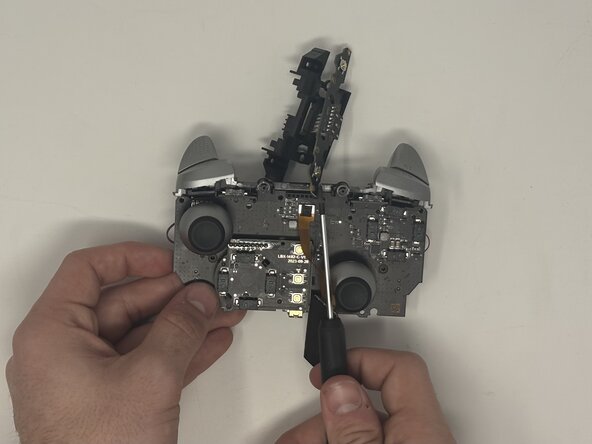
    • Remove the yellow ribbon cable from the handle.

  9. Turtle Beach Stealth Ultra Bumpers Replacement: step 9, image 1 of 2 Turtle Beach Stealth Ultra Bumpers Replacement: step 9, image 2 of 2
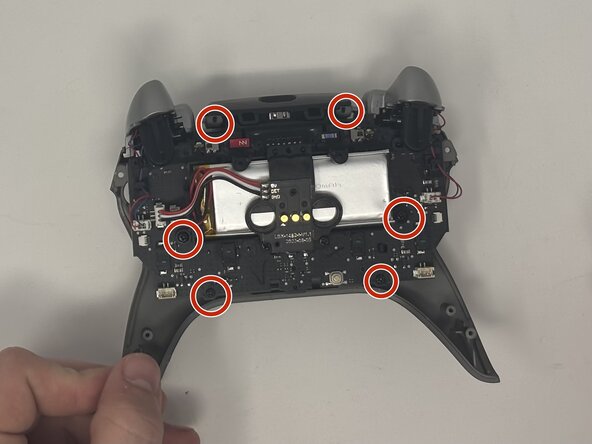
    • Remove the six 10 mm screws connected to the motherboard using a Phillips #00 screwdriver.

  10. Turtle Beach Stealth Ultra Bumpers Replacement: step 10, image 1 of 1
    • Gently pull the motherboard away from the frame.

  11. Turtle Beach Stealth Ultra Bumpers Replacement, Bumpers: step 11, image 1 of 1
    • Remove the two 10 mm screws from the motherboard that keep the screen attached using a Phillips #00 screwdriver.

  12. Turtle Beach Stealth Ultra Bumpers Replacement: step 12, image 1 of 3 Turtle Beach Stealth Ultra Bumpers Replacement: step 12, image 2 of 3 Turtle Beach Stealth Ultra Bumpers Replacement: step 12, image 3 of 3
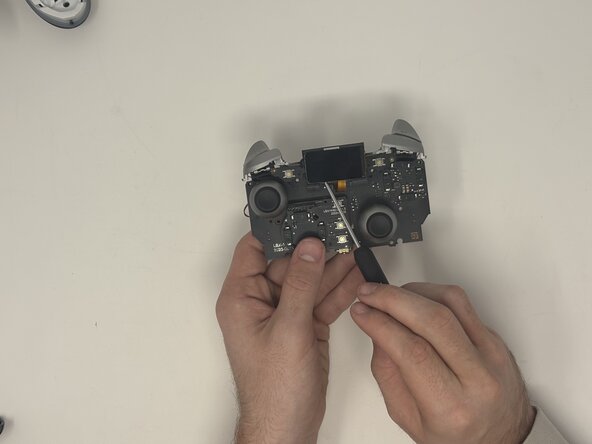
    • Flip the motherboard over to the front side.

    • Use an opening tool to gently pull the LCD screen off of the motherboard.

    • Remove the six 10 mm screws from the motherboard.

  13. Turtle Beach Stealth Ultra Bumpers Replacement: step 13, image 1 of 3 Turtle Beach Stealth Ultra Bumpers Replacement: step 13, image 2 of 3 Turtle Beach Stealth Ultra Bumpers Replacement: step 13, image 3 of 3
    • Pull the latch down that connects the bumper buttons to the motherboard.

    • Pop the bumper buttons off.

Conclusion

To reassemble your device, follow these instructions in reverse order.

One other person completed this guide.

Dominic Dodge

Member since: 09/09/25

799 Reputation

7 Guides authored

Team

0 Guide Comments

Add Comment

View Statistics:

Past 24 Hours: 2

Past 7 Days: 14

Past 30 Days: 55

All Time: 335