Introduction
If the headset does not turn on ( after charging it for hours ) you might have to replace the battery with a newer one. Some ways to check if your headset doesn't not turn on is if the light next to the power button does not turn on or if the microphone doesn't make any sound. You will have to be careful when taking the headset apart because there are many wires attached to the cover and since any excessive force can damage the device. The device should be turned off and at low battery as well to ensure maximum safety and to work away from liquids.
What you need
-
-
Use a Phillips #00 screwdriver to remove the four 2 mm screws from the earpiece.
-
-
-
-
Use a Phillips #00 screwdriver to remove the three 3 mm screws from the board.
-
-
Tool used on this step:Tweezers$4.99
-
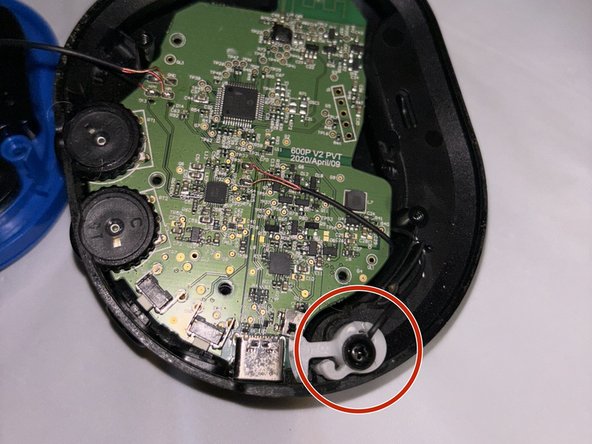
In order to lift the board, we will also have to unscrew the microphone piece .
-
After you unscrew, you can gently lift the white component up
-
-
-
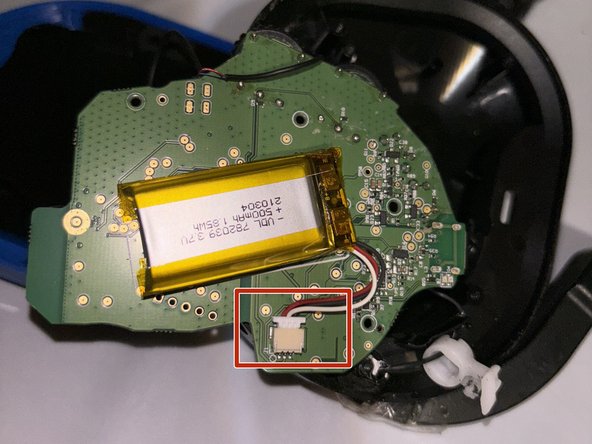
Now gently pry the board from every angle and lift the board to reveal the backside and the battery
-
-
-
Once the battery has been revealed , unclip the old battery and remove it from the board
-
-
-
Once the battery has been removed, clip in the new battery into the white component and place the battery into the board
-


 Ask FixBot






To reassemble your device, follow these instructions in reverse order.
Cancel: I did not complete this guide.
One other person completed this guide.

Team

CSU Los Angeles, Team 5-1, Kershman Fall 2023 Member of CSU Los Angeles, Team 5-1, Kershman Fall 2023
CSULA-KERSHMAN-F23S5G1
1 Member
1 Guide authored
3 Guide Comments
If you are reading this and are looking to replace the battery for a Turtle Beach Stealth 600 Gen 3 headset; note that the battery is in the right earpiece and is even easier to access due to fewer wires. The battery in my gen 3 headset was a "Li-ion Polymer Battery", Model No FT593545P, 3.7v, 1050mAh
