Free Shipping on Domestic Orders $75+

Turtle Beach Recon Cloud Vibration Motors Replacement

What you need

  1. Turtle Beach Recon Cloud Vibration Motors Replacement, Back Casing: step 1, image 1 of 2 Turtle Beach Recon Cloud Vibration Motors Replacement, Back Casing: step 1, image 2 of 2
    • Use a Phillips #00 screwdriver to remove 7 screws from the back casing.

    • The 2 inner screws are hidden under the Turtle Beach sticker.

    • The two screws at the bottom of the grips are countersunk, so you may need a 1/4" extender if your driver doesn’t fit.

  2. Turtle Beach Recon Cloud Vibration Motors Replacement: step 2, image 1 of 2 Turtle Beach Recon Cloud Vibration Motors Replacement: step 2, image 2 of 2
    • Use the iFixit opening tool to wedge it between the inner grip and the casing to pry it off.

    • Do the same to the other inner grip.

    • Do not take off the outer grips as they have wiring attached to them.

  3. Turtle Beach Recon Cloud Vibration Motors Replacement: step 3, image 1 of 2 Turtle Beach Recon Cloud Vibration Motors Replacement: step 3, image 2 of 2
    • Lift off the back casing.

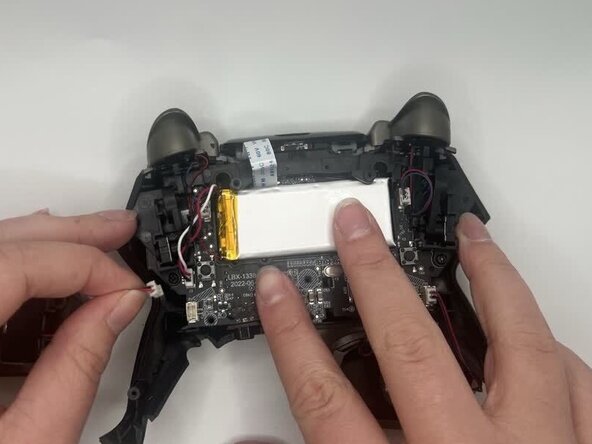
  4. Turtle Beach Recon Cloud Vibration Motors Replacement, Vibration Motors: step 4, image 1 of 2 Turtle Beach Recon Cloud Vibration Motors Replacement, Vibration Motors: step 4, image 2 of 2
    • Unplug the vibration motor cable connector from the motherboard.

    • If the connector doesn't come out easily, use the point of a spudger to push on alternating sides of the connector to "walk" it out of its socket.

    • It may take a lot of alternating before the connector comes out. Be patient, and don't pull on the cables.

    • Be careful as the connector may be tough to pull out. If so, wiggle it out of the socket.

  5. Turtle Beach Recon Cloud Vibration Motors Replacement: step 5, image 1 of 2 Turtle Beach Recon Cloud Vibration Motors Replacement: step 5, image 2 of 2
    • Pull the vibration motor out from the outer grip.

    • The motor should easily come out.

Conclusion

To reassemble your device, follow these instructions in reverse order. Take your e-waste to an R2 or e-Stewards certified recycler.

0 Guide Comments

Add Comment

View Statistics:

Past 24 Hours: 1

Past 7 Days: 3

Past 30 Days: 13

All Time: 53