
Turtle Beach Recon Cloud Top Case Replacement

Alyssa Davis and one other contributor
Last updated on Jan 5, 2026
Views: 232
View statistics:
- Past 24 Hours:
- 1
- Past 7 Days:
- 8
- Past 30 Days:
- 55
- All Time:
- 232
Comments: 0
No one has left comments on this guide. Will you be first?
Go to guide commentsCompleted: 0 1
No one has marked this guide "completed." Will you be the first?
1 person has marked this guide "completed." It's you — great job!
Favorites: 0 1
No one has favorited (and subscribed to) this guide. Will you be the first?
1 person has favorited (and subscribed to) this guide — and that's you!
Introduction
Go to step 1 ↓If you need to take off the front casing of the Turtle Beach Recon Cloud, follow this guide. You may need to access the inner components or want to remove the top casing to replace it.
Before you begin the repair, power off the controller and disconnect it from your PC, console, and any charging cables.
What you need
Tools
-
Spudger4.9


-
-
-
Use a Phillips #00 screwdriver to remove 7 screws from the back casing.
 Ask FixBot
-
-
-
Use the iFixit opening tool to wedge it between the inner grip and the casing to pry it off.
-
Do the same to the other inner grip.
-
-
-
-
-
Insert a spudger between the controller and the battery pack.
-
Use the spudger to loosen the battery from the motherboard.
-
Gently lift the battery pack until just out so as to not pull on the wire attached.
-
-
-
Use the point of a spudger to push on alternating sides of the battery connector to "walk" it out of its socket.
-
If that doesn't work, use a pair of tweezers to firmly grip the sides of the connector and pull straight away from the socket. Hold the tweezers closer to the connector to get a better grip.
-
-
-
-
-
-
Use a Phillips #00 screwdriver to remove the four screws securing the board.
-
-
-
Lift out the motherboard at an angle to detach it from the clips securing it to the case.
-
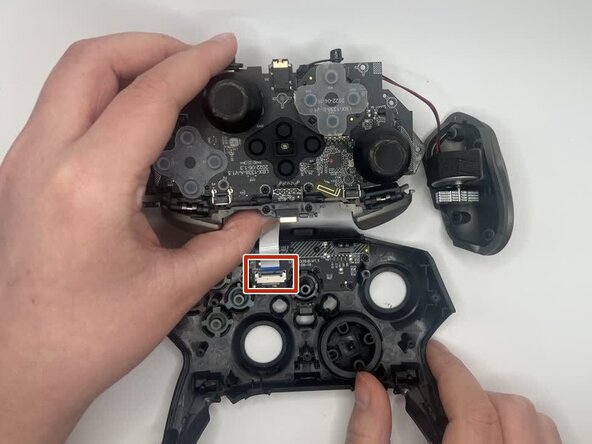
Use a spudger or a clean fingernail to flip up the locking flap of the ZIF connector—this is the unlocked position.
-
Use tweezers or your fingers to gently pull the cable out of its socket.
-
-




To reassemble your device, follow these instructions in reverse order. Take your e-waste to an R2 or e-Stewards certified recycler.

Team

University of North Texas, Team 1-5, Kilpatrick Fall 2025 Member of University of North Texas, Team 1-5, Kilpatrick Fall 2025
UNT-KILPATRICK-F25S1G5
3 Members
84 Guides authored
