
Turtle Beach Recon 70P Ear Pads Replacement

Ryan Momanyi and 2 other contributors
Last updated on Sep 15, 2025
Views: 1.8K
View statistics:
- Past 24 Hours:
- 2
- Past 7 Days:
- 24
- Past 30 Days:
- 107
- All Time:
- 1,805
Comments: 1
1 comment on steps.
Completed: 1 2
1 person has marked this guide "completed." Will you be next?
2 people have marked this guide "completed." Including you — great job!
Favorites: 0 1
No one has favorited (and subscribed to) this guide. Will you be the first?
1 person has favorited (and subscribed to) this guide — and that's you!
Featured Student Guide
This guide has been the hard work of our awesome students and is found to be exceptionally cool by the iFixit staff.
Introduction
Go to step 1 ↓Earpads tend to tear after extensive use, disrupting the comfortable experience of using your headset. This guide will take you through the steps to replacing the ear pads on your gaming headset.
What you need
Tools

-
-
-
Gently pull the edge of the ear pads until the leather comes loose from the slot.
 Ask FixBot
-
-
-


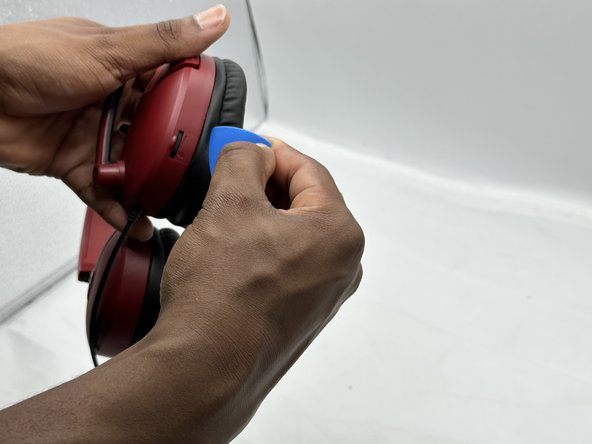
Your ear pads should be replaced if all these steps were followed correctly.
Cancel: I did not complete this guide.
One other person completed this guide.

Team

University of North Texas, Team 3-1, Kilpatrick Spring 2024 Member of University of North Texas, Team 3-1, Kilpatrick Spring 2024
UNT-KILPATRICK-S24S3G1
4 Members
60 Guides authored
