
Turtle Beach REACT-R ABXY Buttons Replacement

Dodi Imam and 2 other contributors
Last updated on Jul 2, 2024
Views: 902
View statistics:
- Past 24 Hours:
- 1
- Past 7 Days:
- 9
- Past 30 Days:
- 68
- All Time:
- 902
Comments: 0
No one has left comments on this guide. Will you be first?
Go to guide commentsCompleted: 1 2
1 person has marked this guide "completed." Will you be next?
2 people have marked this guide "completed." Including you — great job!
Favorites: 0 1
No one has favorited (and subscribed to) this guide. Will you be the first?
1 person has favorited (and subscribed to) this guide — and that's you!
Introduction
Go to step 1 ↓The ABXY buttons are crucial for game and menu control, making them essential for gaming consoles. These buttons are easily accessible once the motherboard is removed. If your ABXY buttons are sticking or unresponsive, it might be time to consider cleaning or replacing them.
This guide will show you how to access the REACT-R and replace the ABXY buttons. The only tool needed for this guide is a Phillips #00 screwdriver.
What you need
Tools

-
-
-
Place the controller face down.
-
Use a Phillips #00 screwdriver to remove the seven 9.2 mm Phillips screws that secure the rear case.
-
Use both hands to lift the backplate away from the controller.
 Ask FixBot
-
-
-
-
-
Use a Phillips #00 to remove the four 9.2 mm screws that secure the motherboard.
-
Gently lift the motherboard up and out of the chassis.
-
-
-
-


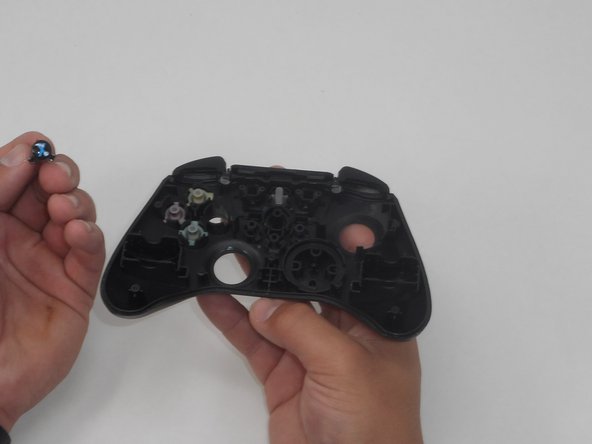
To reassemble your device, follow these instructions in reverse order.
Cancel: I did not complete this guide.
One other person completed this guide.

Team

University of Memphis, Team 1-5, Sneed Spring 2024 Member of University of Memphis, Team 1-5, Sneed Spring 2024
UM-SNEED-S24S1G5
4 Members
72 Guides authored
