
Turtle Beach PX22 Microphone Replacement

James de Iturrondo and 3 other contributors
Last updated on Jan 21, 2026
Views: 7.5K
View statistics:
- Past 24 Hours:
- 7
- Past 7 Days:
- 21
- Past 30 Days:
- 92
- All Time:
- 7,504
Comments: 3
3 guide comments.
Go to guide commentsCompleted: 2 3
2 people have marked this guide "completed." Will you be next?
3 people have marked this guide "completed." Including you — great job!
Favorites: 2 3
2 people have favorited (and subscribed to) this guide. Will you be next?
3 people have favorited (and subscribed to) this guide — including you!
Needs More Images
A few more images would make this guide's procedures crystal clear.
Missing Steps
Oops! This guide is currently missing one or more important steps.
Introduction
Go to step 1 ↓If your microphone does not work after troubleshooting, it may need to be replaced. This guide will show the user how to remove a broken microphone and replace it with a new one.
This guide requires desoldering the microphone connectors from a small board. It is easier to desolder and solder connections if you remove the board first. This step is missing from the guide.
Use a soldering iron to carefully desolder the microphone wire connectors from the board. Take care not to overheat the board or nearby components. Soldering produces fumes, so work in a well-ventilated area and avoid inhaling smoke. Always handle the iron carefully, as it can reach extremely high temperatures.
If you’re new to soldering, this How to Solder and Desolder Connections guide is a great reference.
Before you begin the repair, make sure to disconnect your headphones from the audio jack and the charger.
What you need
Tools


-
-
-
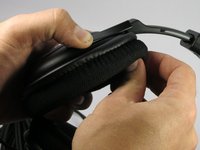
Use your fingers to peel off ear cushion by pinching and pulling off the leather.
-
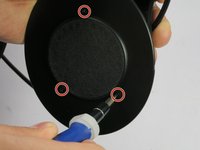
Use a Philips #00 head screwdriver to remove three 7.1 mm screws around the speaker.
-
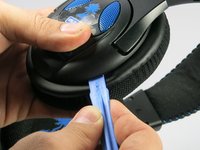
Gently lift the speaker housing off the ear cup, being careful not to pull on the driver/speaker assembly, which is still connected to a board inside.
 Ask FixBot
-
-
-
Remove the 7.1 mm screw with a Phillips #2 screwdriver to gain access to the microphone.
-
-
-
Use a soldering iron to carefully desolder the microphone wire connectors from the board.
-
Insert the new microphone and solder the wires into the correct positions.
-
Replace the screw that secures the microphone with a Phillips #2 screwdriver.
-
Pull the excess microphone wire back into the speaker housing.
-
-
-
-
Position the speaker on the headset so that the screw holes line up. It should click into place.
-
Use a Phillips #00 screwdriver to secure the three screws.
-
Replace the ear cushion.
-
-


To reassemble your device, follow these instructions in reverse order. Take your e-waste to an R2 or e-Stewards certified recycler.
Cancel: I did not complete this guide.
2 other people completed this guide.

Team

UMass Dartmouth, Team 3-1, Duarte Spring 2015 Member of UMass Dartmouth, Team 3-1, Duarte Spring 2015
UMASSD-DUARTE-S15S3G1
4 Members
48 Guides authored
3 Guide Comments
i need the cable for my px 24 it broke in my phone how do i get a new cable to fix my px 24 headset
