
Turtle Beach Elite 800 Audio Board Replacement

Johnny Lofton and one other contributor
Last updated on Jun 22, 2017
Views: 2.5K
View statistics:
- Past 24 Hours:
- 2
- Past 7 Days:
- 20
- Past 30 Days:
- 84
- All Time:
- 2,529
Comments: 10
10 comments on steps.
Completed: 2 3
2 people have marked this guide "completed." Will you be next?
3 people have marked this guide "completed." Including you — great job!
Favorites: 0 1
No one has favorited (and subscribed to) this guide. Will you be the first?
1 person has favorited (and subscribed to) this guide — and that's you!
Better Introduction
Improve this guide by completing or revising its introduction.
What you need
Tools


-
-
-
To remove the ear cushions, press firmly down and rotate them clockwise, it should twist about 2mm and release, allowing you to pull it off.
 Ask FixBot
-
-
-
-
-
Remove the screws (9.47 mm Phillips head) from the blue plating on the headset to reveal the inside.
-
-
-
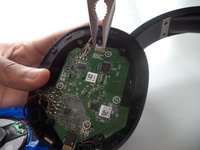
If you are working on the LEFT side ear, you will first have to detach the battery by gently unplugging the white plug on the top of the board.
-
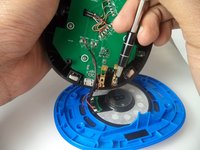
If you are working on the RIGHT side ear, you will first have to remove the charging contacts (2 7.92 mm Phillips screws).
-
-
-
-
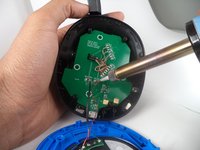
Desolder the necessary wires. (Each side will be slightly different.)
-
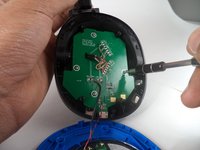
Remove the 4 screws (7.71mm Phillips head) using the #0 screw bit, that are holding the board in place.
-
Finally, remove the audio board.
-
-




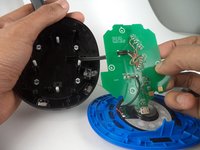
To reassemble your device, follow these instructions in reverse order.
Cancel: I did not complete this guide.
2 other people completed this guide.

Team

Arkansas State University, Team 1-5, Chamberlain Spring 2017 Member of Arkansas State University, Team 1-5, Chamberlain Spring 2017
ARSU-CHAMBERLAIN-S17S1G5
3 Members
60 Guides authored
