Introduction
This guide will show you how to remove the speakers. To access, the Front Panel Guide must completed. This repair may only be necessary if your speakers are making distorting audio or hissing sounds.
Before starting the guide, ensure your device is powered off completely and disconnected from any charging source. A Phillips screwdriver is required to remove the speaker screws, specifically, the PH2 bit.
This guide does require you to solder, if you are unfamiliar with soldering, here is a recommended guide. Soldering is dangerous and can cause irreparable damage without caution.
What you need
-
-
-
Place the speaker on your work surface.
-
Use a plastic opening tool to lift the edge of the rubber base and peel it away from the housing.
-
Set the rubber base aside.
 Ask FixBot
-
-
-
Remove the 5.4 mm screw securing the small carry strap using a 4 mm flathead screwdriver.
-
Gently slide the strap and its plastic bracket out of place.
-
Set the strap and screw aside.
-
-
-
-
Use a Phillips #00 screwdriver to remove the 11.4 mm screws along the panel.
-
Gently lift the rubber control panel away from the housing.
-
-
-
-
-
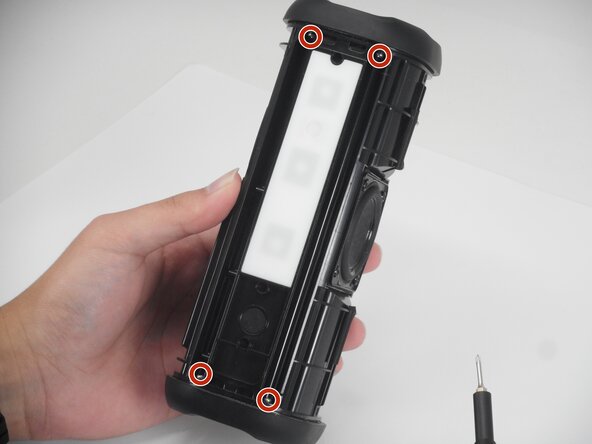
Rotate the Tribit StormBox, with the middle driver facing out.
-
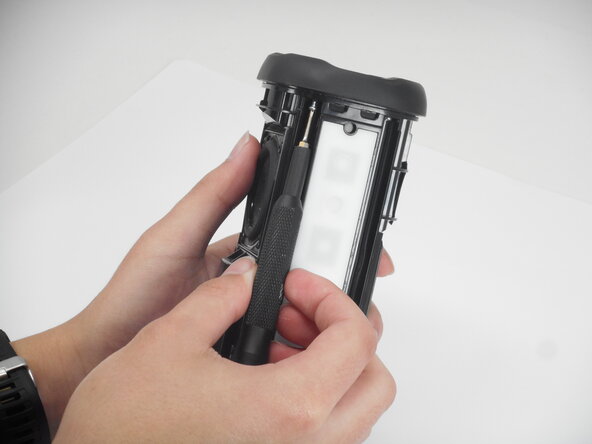
Remove the four 7.7 mm screws securing the driver with a Phillips #2 screwdriver.
-
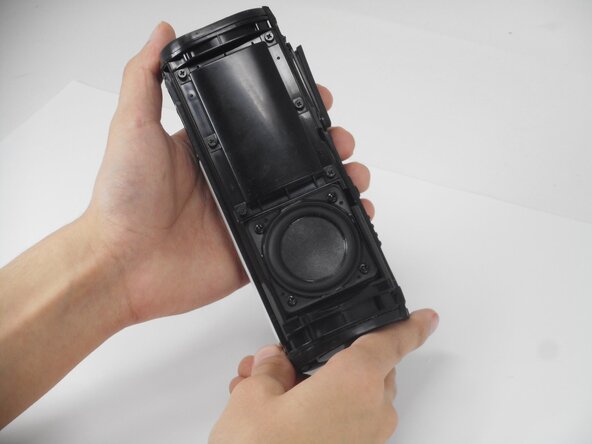
Gently lift the driver out with care not to strain the connections.
-
-
-
Rotate the Tribit StormBox to face the bottom driver.
-
Remove the four 7.7 mm screws with the Phillips #2 screwdriver.
-
Gently lift the driver out with care not to strain the connections.
-
-
-
Gently pulling the speakers out from the frame, will expose the soldering points.
-
Place desoldering braid over the exposed connections.
-
Apply your soldering iron to the exposed soldering points while using tweezers to hold onto the wires to disconnect it safely.
-
-






To reassemble your device, follow the above steps in reverse order.
Take your e-waste to an R2 or e-Stewards certified recycler.
Repair didn’t go as planned? Try some basic troubleshooting or ask our Answers community for help.

Team

University of Memphis, Team 1-5, Sneed Spring 2026 Member of University of Memphis, Team 1-5, Sneed Spring 2026
UM-SNEED-S26S1G5
3 Members
72 Guides authored
