Introduction
This guide would be useful for replacing broken RAM or upgrading the working RAM to make your Toshiba TECRA R940 run better.
This laptop has a comparatively easy procedure to replace RAM.
What you need
-
-
-
Unscrew the screw attached to the small back panel, and set the back panel aside.
 Ask FixBot
-
-
-
-
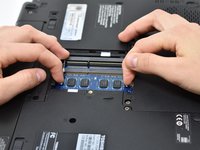
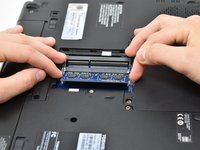
Pull the metal brackets away from the RAM card to unlock it from the slot, then pull the RAM card out.
-
-
-
Repeat the previous step of pulling the RAM card out for the second card, but using the lower brackets.
-
-


To reassemble your device, follow these instructions in reverse order.
Cancel: I did not complete this guide.
One other person completed this guide.

Team

Central Washington University, Team S1-G5, Pengilly Fall 2018 Member of Central Washington University, Team S1-G5, Pengilly Fall 2018
CWU-PENGILLY-F18S1G5
3 Members
84 Guides authored
