Free Shipping on Domestic Orders $75+

Toshiba T2400CS Hard drive Replacement

    1. Toshiba T2400CS Hard drive Replacement, Removing the battery: step 1, image 1 of 1
      • 1.A) Slide the little plastic cover forward

      • 1.B) Push the button underneath the cover

      • 1.C) Slide the battery out

      Ask FixBot

      Add Comment

    2. Toshiba T2400CS Hard drive Replacement, Undo the screws on the bottom of the laptop: step 2, image 1 of 1
      • The bottom of the laptop has 6 visible screws and the 7th one is hidden under the battery

      Ask FixBot

      Add Comment

    3. Toshiba T2400CS Hard drive Replacement, Undo the screws on the back of the laptop: step 3, image 1 of 1
      • The back of the laptop has 2 screws.

      Ask FixBot

      Add Comment

    4. Toshiba T2400CS Hard drive Replacement, Removing the palmrest: step 4, image 1 of 1
      • 4.A) Gently lift the bottom of the palmrest up

      • 4.B) Carefully pull the palmrest toward yourself, dislodging it from the top half of the case

      Ask FixBot

      Add Comment

    5. Toshiba T2400CS Hard drive Replacement, Removing the keyboard: step 5, image 1 of 1
      • 5.A) Gently release the ribbon cable tabs and pull the ribbon cable out

      • 5.B) Raise the bottom of the keyboard and pull it out of the case

      Ask FixBot

      Add Comment

    6. Toshiba T2400CS Hard drive Replacement, Release the top part of the case: step 6, image 1 of 1
      • 6.A) Undo the screw

      • 6.B) Gently use a flat tool to pull back the plastic tabs, releasing the sides

      Ask FixBot

      Add Comment

    7. Toshiba T2400CS Hard drive Replacement, Remove the top part of the case: step 7, image 1 of 1
      • 7.A) Carefully pull the bottom of the top part up

      • 7.B) Gently pull up and toward yourself to remove the part

      Ask FixBot

      Add Comment

    8. Toshiba T2400CS Hard drive Replacement, Prepare to remove the daughter board: step 8, image 1 of 2 Toshiba T2400CS Hard drive Replacement, Prepare to remove the daughter board: step 8, image 2 of 2
      • 8.A) Undo all the highlighted screws

      • 8.B) Carefully release the CMOS battery cable from the board

      • 8.C) (optional) Lift up and remove the bottom right latch piece

      Ask FixBot

      Add Comment

    9. Toshiba T2400CS Hard drive Replacement, Remove the daughter board: step 9, image 1 of 1
      • Carefully but firmly lift up the top part of the daughter board by the corners from it's connector and lift the entire board out of the case.

      Ask FixBot

      Add Comment

    10. Toshiba T2400CS Hard drive Replacement, Remove the hard drive: step 10, image 1 of 1
      • 10.A) Undo the screws holding the hard drive bracket in place

      • 10.B) Slide the hard drive toward yourself to release it from the connector

      Ask FixBot

      Add Comment

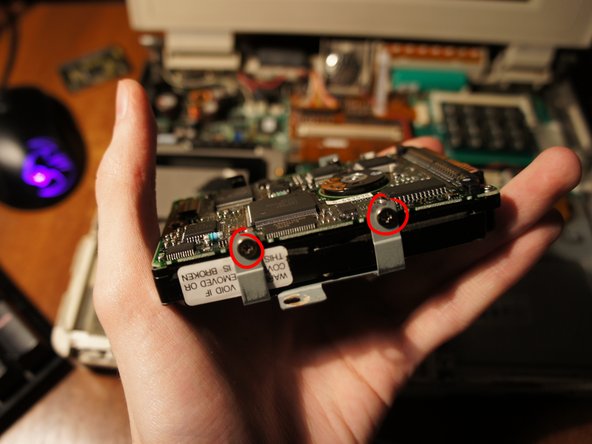
    11. Toshiba T2400CS Hard drive Replacement: step 11, image 1 of 2 Toshiba T2400CS Hard drive Replacement: step 11, image 2 of 2
      • Undo the screws on each side of the bracket and your hard drive is free!

      • To reassemble the computer with a new hard drive, repeat the steps backwards.

      Ask FixBot

      Add Comment

Conclusion

To reassemble your device, follow these instructions in reverse order.

Cancel: I did not complete this guide.

2 other people completed this guide.

slydoge

Member since: 02/19/20

253 Reputation

1 Guide authored

1 Guide Comment

Thanks mom very cool

Bunneh 4444 - Reply Share

Add Comment

View Statistics:

Past 24 Hours: 0

Past 7 Days: 9

Past 30 Days: 36

All Time: 1,158