Introduction
When you first purchased your device, the battery lasted for up to 11 hours of life. Now, your battery lasts for 1 hour or less, or you even have to keep it plugged in all the time for it to be powered.
-
-
-
-
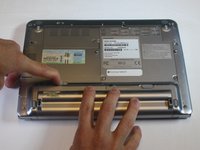
Use your left hand to hold latch 2 to the left.
-
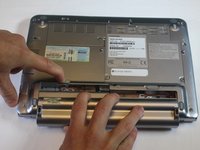
Simultaneously take the battery out with your right hand.
-

 Ask FixBot


To reassemble your device, follow these instructions in reverse order.
Cancel: I did not complete this guide.
One other person completed this guide.

Team

USF Tampa, Team 5-5, Lacy Fall 2016 Member of USF Tampa, Team 5-5, Lacy Fall 2016
USFT-LACY-F16S5G5
3 Members
60 Guides authored
