Free Shipping on Domestic Orders $75+

TiVo Series 2 TCD24008A Remote Sensor Replacement

What you need

  1. TiVo Series 2 TCD24008A Remote Sensor Replacement, Cover: step 1, image 1 of 1
    • Unscrew the five 0.31 inch T-9 screws on the back cover.

    Ask FixBot

    Add Comment

  2. TiVo Series 2 TCD24008A Remote Sensor Replacement: step 2, image 1 of 1
    • Slide the cover towards the back until it is no longer under the front cover.

    Ask FixBot

    Add Comment

  3. TiVo Series 2 TCD24008A Remote Sensor Replacement: step 3, image 1 of 1
    • Lift the cover up and off the device.

    Ask FixBot

    Add Comment

  4. TiVo Series 2 TCD24008A Remote Sensor Replacement, Remote Sensor: step 4, image 1 of 1
    • Unplug the ribbon cable from the motherboard. Some force may be required for this step, so be careful not to rip the ribbon cable.

    Ask FixBot

    Add Comment

  5. TiVo Series 2 TCD24008A Remote Sensor Replacement: step 5, image 1 of 1
    • Unscrew the two 0.31 inch T-9 screws on the inside of the front cover.

    Ask FixBot

    Add Comment

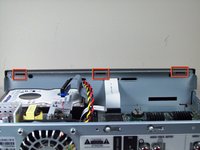
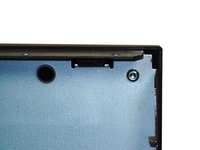
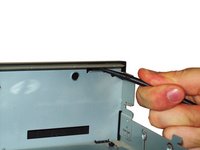
  6. TiVo Series 2 TCD24008A Remote Sensor Replacement: step 6, image 1 of 3 TiVo Series 2 TCD24008A Remote Sensor Replacement: step 6, image 2 of 3 TiVo Series 2 TCD24008A Remote Sensor Replacement: step 6, image 3 of 3
    • Use a spudger to push the three tabs on the inside of the front cover up and forward to release the cover.

    Ask FixBot

    Add Comment

  7. TiVo Series 2 TCD24008A Remote Sensor Replacement: step 7, image 1 of 1
    • Pull the front cover down and away from the device to separate it completely. Be careful not to tear the ribbon cable as you are removing the front cover.

    Ask FixBot

    Add Comment

  8. TiVo Series 2 TCD24008A Remote Sensor Replacement: step 8, image 1 of 1
    • Unscrew the two 0.31 inch T-9 screws on the back of the sensor.

    Ask FixBot

    Add Comment

  9. TiVo Series 2 TCD24008A Remote Sensor Replacement: step 9, image 1 of 1
    • Lift the sensor up to remove it.

    Ask FixBot

    Add Comment

Conclusion

To reassemble your device, follow these instructions in reverse order.

Cancel: I did not complete this guide.

Shauna

Member since: 10/10/11

37 Reputation

2 Guides authored

Team

Cal Poly, Team 5-33, Amido Fall 2011 Member of Cal Poly, Team 5-33, Amido Fall 2011

CPSU-AMIDO-F11S5G33

4 Members

7 Guides authored

0 Guide Comments

Add Comment

View Statistics:

Past 24 Hours: 0

Past 7 Days: 7

Past 30 Days: 21

All Time: 1,284