This translation was generated by a machine and has not been reviewed by a person yet. Speak this language? Review it.

Thrustmaster T-LCM Pedal Maintenance

Kaysleam and one other contributor
Last updated on Sep 2, 2026
Views: 2K
View statistics:
- Past 24 Hours:
- 3
- Past 7 Days:
- 22
- Past 30 Days:
- 129
- All Time:
- 2,010
Comments: 0
No one has left comments on this guide. Will you be first?
Go to guide commentsCompleted: 1 2
1 person has marked this guide "completed." Will you be next?
2 people have marked this guide "completed." Including you — great job!
Favorites: 0 1
No one has favorited (and subscribed to) this guide. Will you be the first?
1 person has favorited (and subscribed to) this guide — and that's you!
Needs Better Images
Better photos will improve this guide. Help out by taking, editing, or uploading new ones!
Community-Contributed Guide
An awesome member of our community made this guide. It was not created by iFixit staff.
Introduction
Go to step 1 ↓This guide shows how to open and clean a Thrustmaster T-LCM pedal set. You will be able to dust the interior and clean the axes as well as the metal contacts of the accelerator and clutch pedals.
What you need
Tools

-
-
-
Remove the screws from each pedal head (highlighted in red).
-
Flip the pedal set and remove 14 screws from the bottom (highlighted in red).
-
Remove the top cover.
 Ask FixBot
-
-
-
Using a can of compressed air or a dust blower, remove dust and any other grime.
-
-
-
-
Using a cloth, clean the extremities of the axes of both the gas and clutch pedal.
-
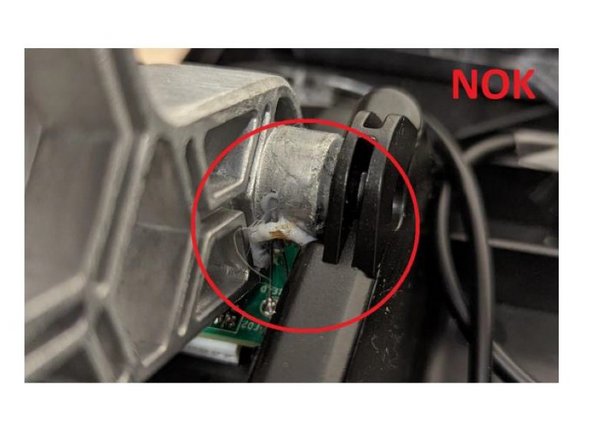
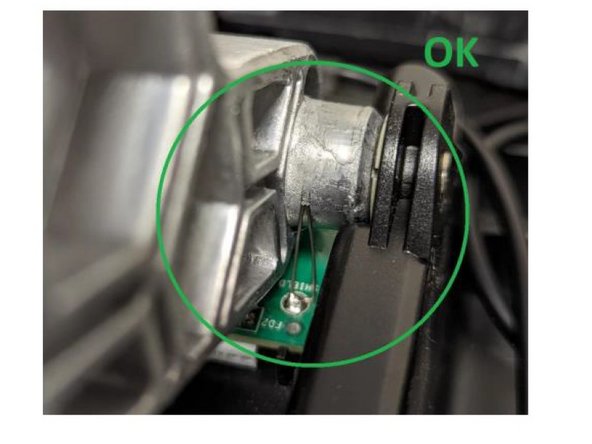
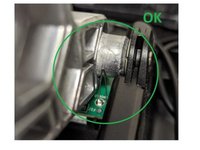
Carefully clean the metal strands soldered to the PCB. These two metal strands must always remain in contact with the axis throughout the pedal’s entire movement.
-
-


To reassemble your device, follow the instructions in reverse order.
Cancel: I did not complete this guide.
One other person completed this guide.
Special thanks to these translators:
100%


These translators are helping us fix the world! Want to contribute?
Start translating ›

